
How to Export Cycle Tracking Data from Apple Health to CSV or PDF
Last updated: April 19th, 2026

By Marina
Co-founder, vitalina

Apple Health can record a remarkable amount of cycle data - period flow, spotting, cramps and other symptoms, basal body temperature, cervical mucus quality, ovulation and pregnancy test results, and cycle factors like pregnancy, lactation, or contraceptive use. But when your OB-GYN, endocrinologist, or fertility specialist asks for your cycle history, getting that data out in a usable format is not straightforward.
This guide shows you how to export your cycle tracking data as a clean PDF or CSV file using vitalina, a free iPhone app that reads your Apple Health data and generates doctor-ready reports in under two minutes.
Why owning your cycle data matters
Cycle data is some of the most personal health data you will ever record. It tells a story about fertility, hormonal health, chronic conditions like endometriosis and PCOS, perimenopause, recovery from pregnancy, and countless other things that shape daily life. Women deserve to own that story - to be able to read it, share it on their terms, and walk into an appointment with something better than memory and a rough guess at dates.
Apple shipped the Apple Watch in 2015 without reproductive health tracking. It took years before women were treated as a first-class audience for Apple Health, and many of us still remember the message that sent. As a woman building vitalina, I want to make sure cycle tracking is never an afterthought in the products I create - and that when you want your data out of Apple Health, you can get it in a form that actually serves you.
A short history of cycle tracking in Apple Health
- September 2014 - Apple Health launched without reproductive health tracking. The omission drew significant public criticism.
- September 2015 - With iOS 9, Apple added a Reproductive Health section to HealthKit, letting users manually log menstruation, basal body temperature, and cervical mucus quality.
- June 2019 - Apple announced a dedicated Cycle Tracking app for iPhone and Apple Watch at WWDC 2019.
- September 2019 - Cycle Tracking launched publicly with period and fertility window predictions, symptom logging, and notifications.
- December 2020 - Apple added Cycle Factors, letting users log pregnancy, lactation, or contraceptive use to improve prediction accuracy.
Five years after launch is a long time to wait to be included. Whatever app you now use to log your cycle - Apple's built-in one, Clue, Flo, Natural Cycles, or something else - the important thing is that the data belongs to you, and you can take it with you.
Why Apple Health's built-in export does not work for cycle data
Apple Health does let you export your data as XML, but the result is a single file containing every health data point your iPhone has ever recorded. There is no way to filter by metric, so your cycle data is buried alongside steps, sleep, nutrition, and everything else. There is no date range control - you cannot ask for just the last six cycles. The file is not readable by a human, and there are no charts or summaries.
Apple doesn't hand you the XML directly either. You get an Export.zip archive that you have to unzip on a computer. Inside is a folder called apple_health_export, and the full Export.xml sits inside it alongside supporting files. For long-time Apple Watch users that XML can easily reach 2.9 GB - 11 years of continuous health data in one file.
Cycle data is especially painful in this format: a single period might be represented as dozens of XML entries for flow level, spotting, symptoms, and basal body temperature samples, all interleaved with unrelated metrics and spread across a file your OB-GYN cannot open.
vitalina solves this by reading your Apple Health data locally on your iPhone and letting you export just your cycle tracking data - for any date range you choose - as a PDF or CSV.
What you'll need
- An iPhone running iOS 18 or later
- Cycle tracking data recorded in Apple Health (from Apple's Cycle Tracking app, Apple Watch, or a third-party app like Clue, Flo, Natural Cycles, Ovia, or Stardust)
The walkthrough · 8 steps · ~2 min
How to export cycle tracking data, step by step
Download vitalina
Download vitalina from the App Store. It's free to use with no account or sign-up required.
Allow access to Apple Health
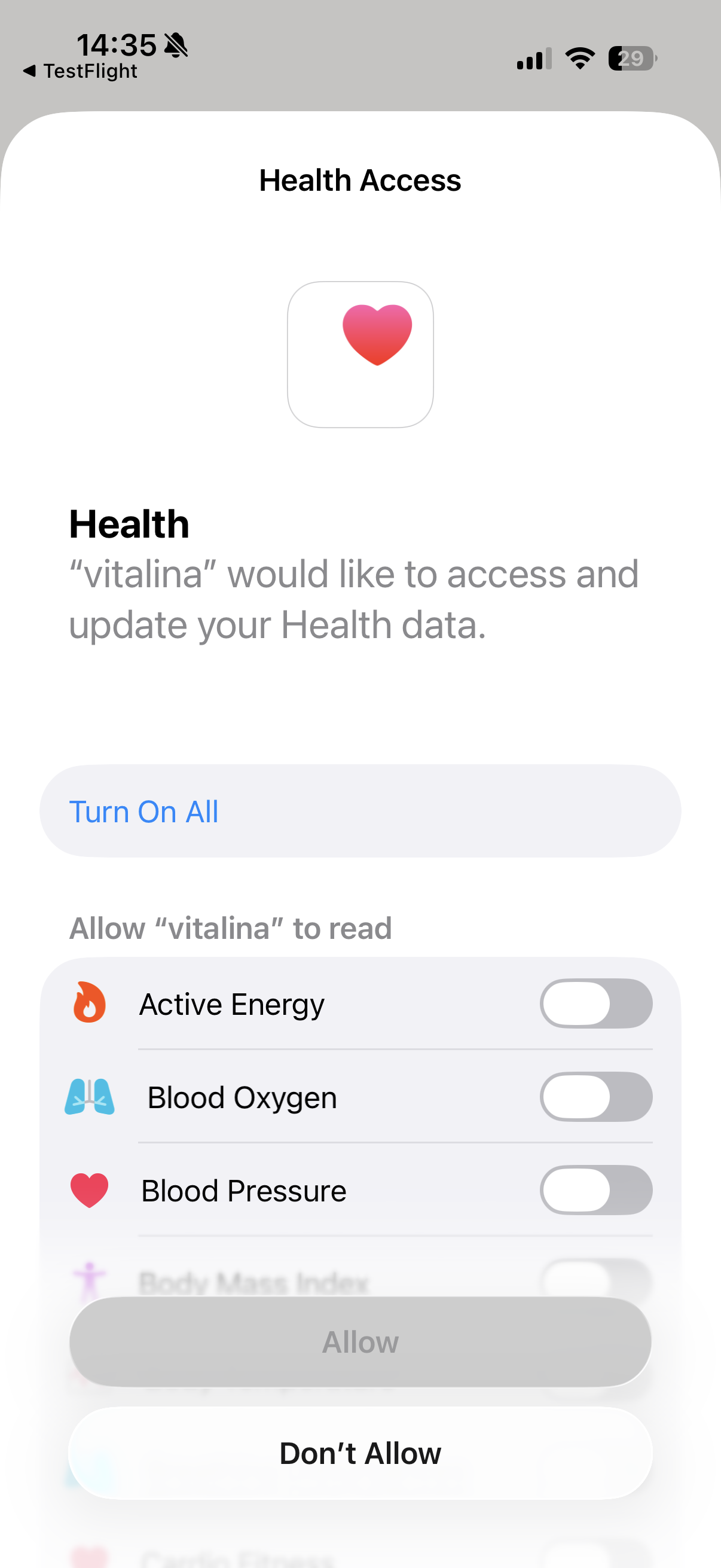
When you first open vitalina, tap Allow Health Access and confirm the permissions in the Apple Health prompt. vitalina only requests read access - it cannot modify or delete your health data.
Your data never leaves your device. vitalina processes everything locally on your iPhone with no cloud uploads, no tracking, and no analytics - which matters especially for reproductive health data.
Create a custom export
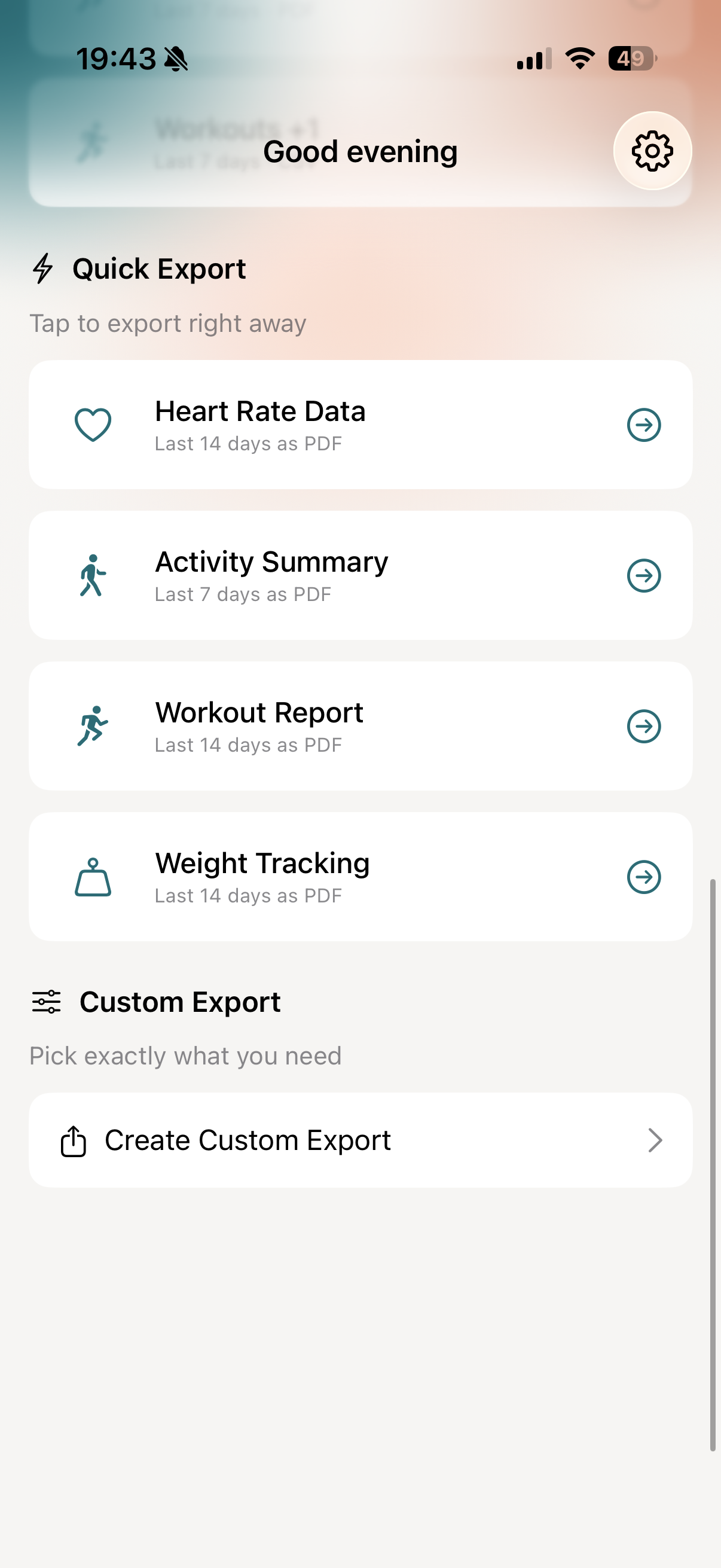
On the main screen, tap Create Custom Export. A custom export gives you full control over which cycle metrics to include, the date range, and the output format.
Select your cycle tracking metrics
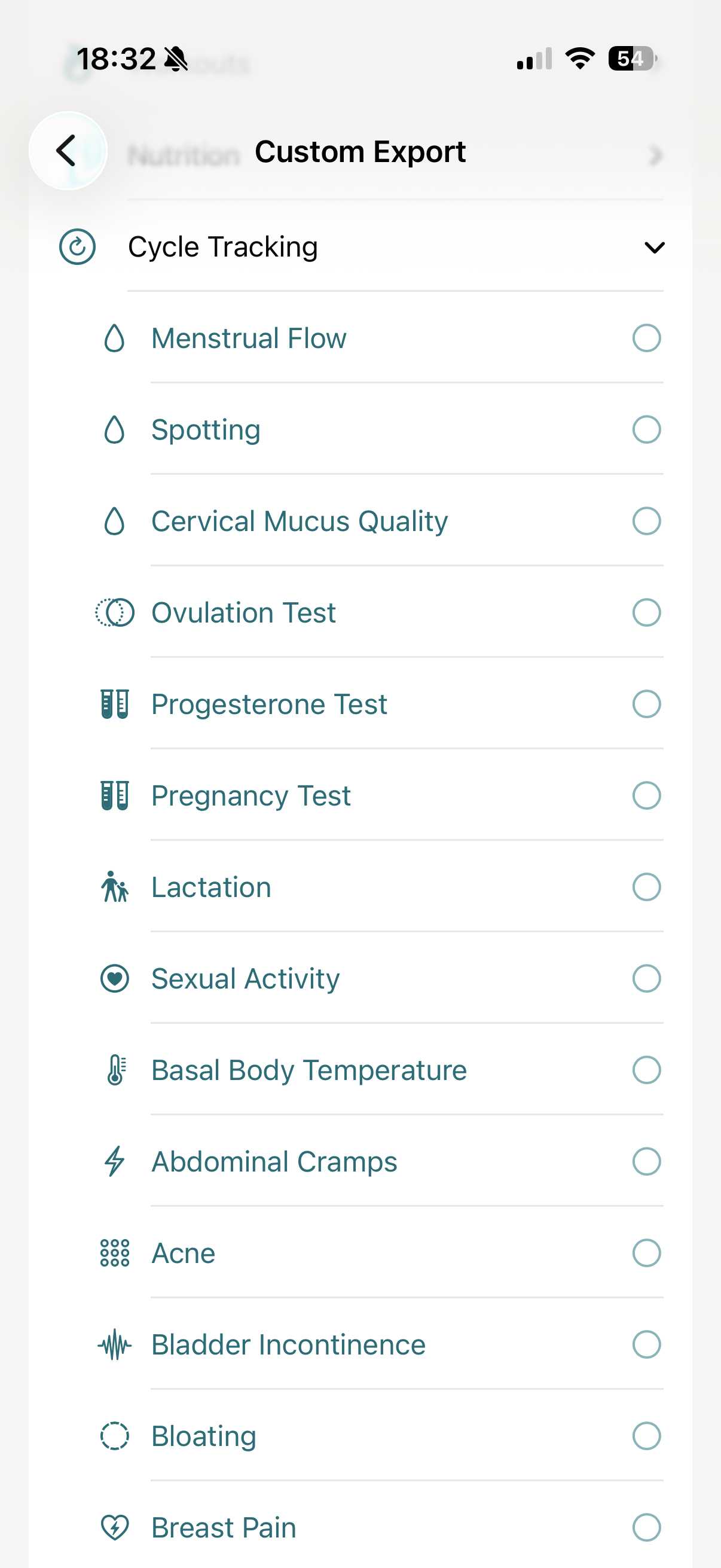
In the custom export, you'll see all available health metrics grouped by category. Under Cycle Tracking, you can select any combination of:
- Menstruation - period start and end dates, with flow level (light, medium, heavy) and spotting
- Symptoms - cramps, bloating, headache, mood changes, breast tenderness, fatigue, nausea, acne, and more
- Basal body temperature - the morning temperature reading used for fertility awareness
- Cervical mucus quality - dry, sticky, creamy, watery, or egg-white
- Ovulation test result - positive, negative, or indeterminate
- Pregnancy test result - positive, negative, or indeterminate
- Sexual activity - with or without protection, when logged
- Cycle factors - pregnancy, lactation, or contraceptive use
For an OB-GYN appointment the most commonly requested combination is menstruation, flow, spotting, symptoms (especially cramps), and basal body temperature. For a fertility specialist you'll usually want to add cervical mucus and ovulation test results.
Pick a date range
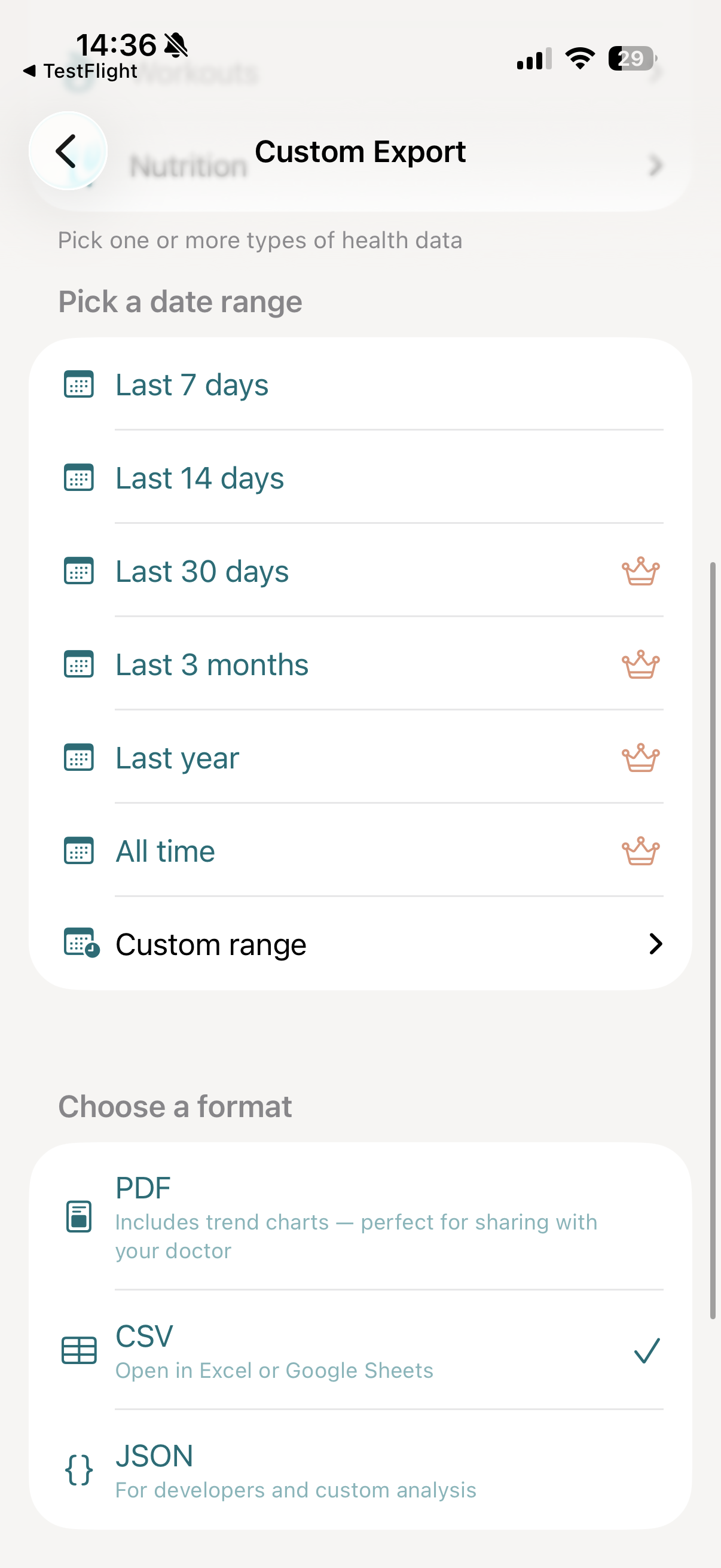
Cycle data is only useful in context - a single cycle rarely tells the full story. vitalina lets you pick the window that fits your appointment:
- Last 7 days and Last 14 days - available for free
- Last 30 days, 3 months, 1 year, and All time - available with vitalina Pro
- Custom date range - pick any exact start and end date with Pro
If your OB-GYN or fertility specialist wants to see three to six months of cycles - for example to assess cycle regularity, diagnose endometriosis or PCOS, review perimenopausal changes, or plan a fertility workup - the Pro upgrade is a one-time purchase that unlocks all extended date ranges.
Choose your export format
For cycle tracking, two formats are most useful:
- PDF: The best format for doctor appointments. Includes a cycle timeline, period length and flow summary, basal body temperature chart, a symptom overview, and clean formatting your OB-GYN or endocrinologist can read immediately. You can email it, AirDrop it, or print it before your appointment.
- CSV: Opens in Excel or Google Sheets. Ideal for cycle-by-cycle analysis, fertility charting, or when a specialist wants to import the raw data into another tool.
Both formats are available for free.
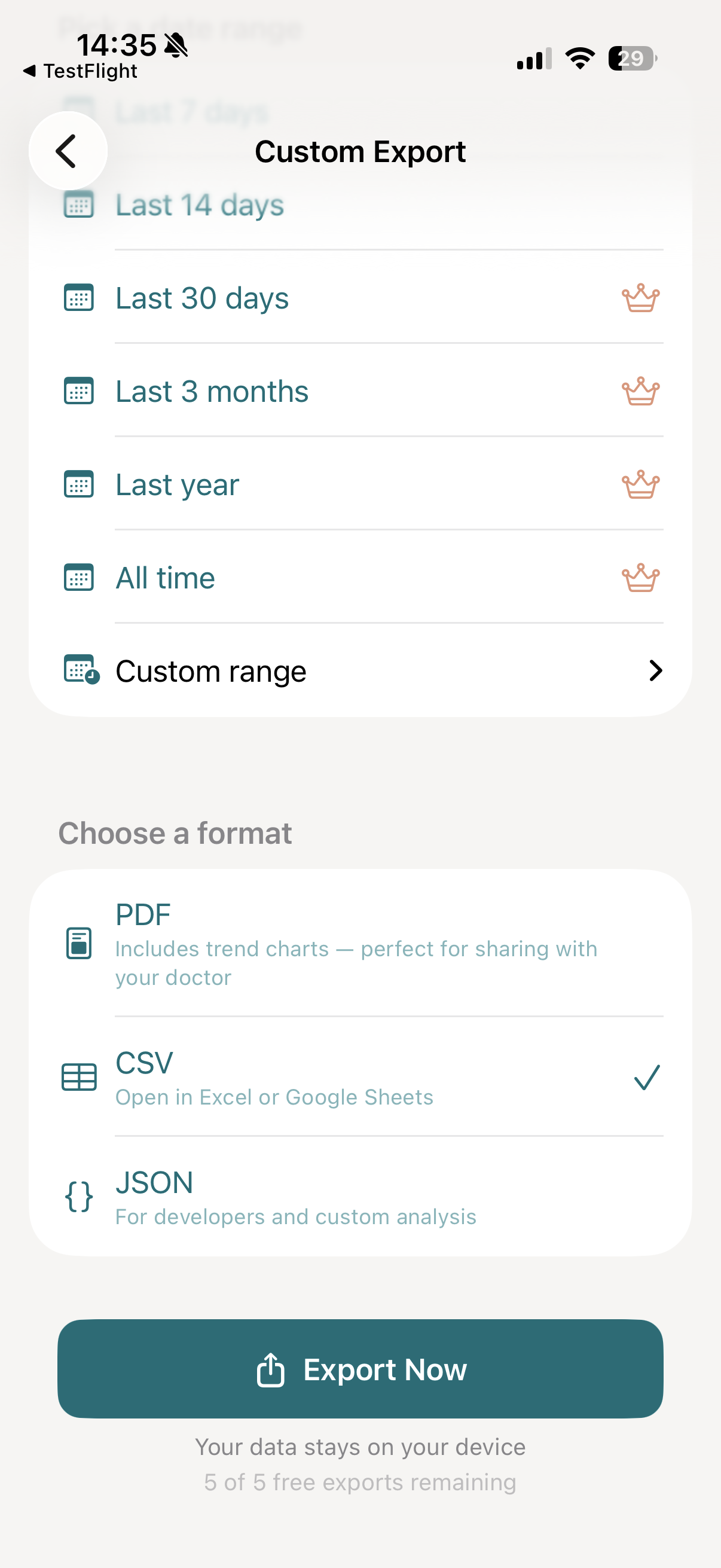
Tap "Export Now"
Tap Export Now. vitalina reads your cycle data from Apple Health, formats the export, and generates your file - usually within a few seconds, even for years of logged cycles.
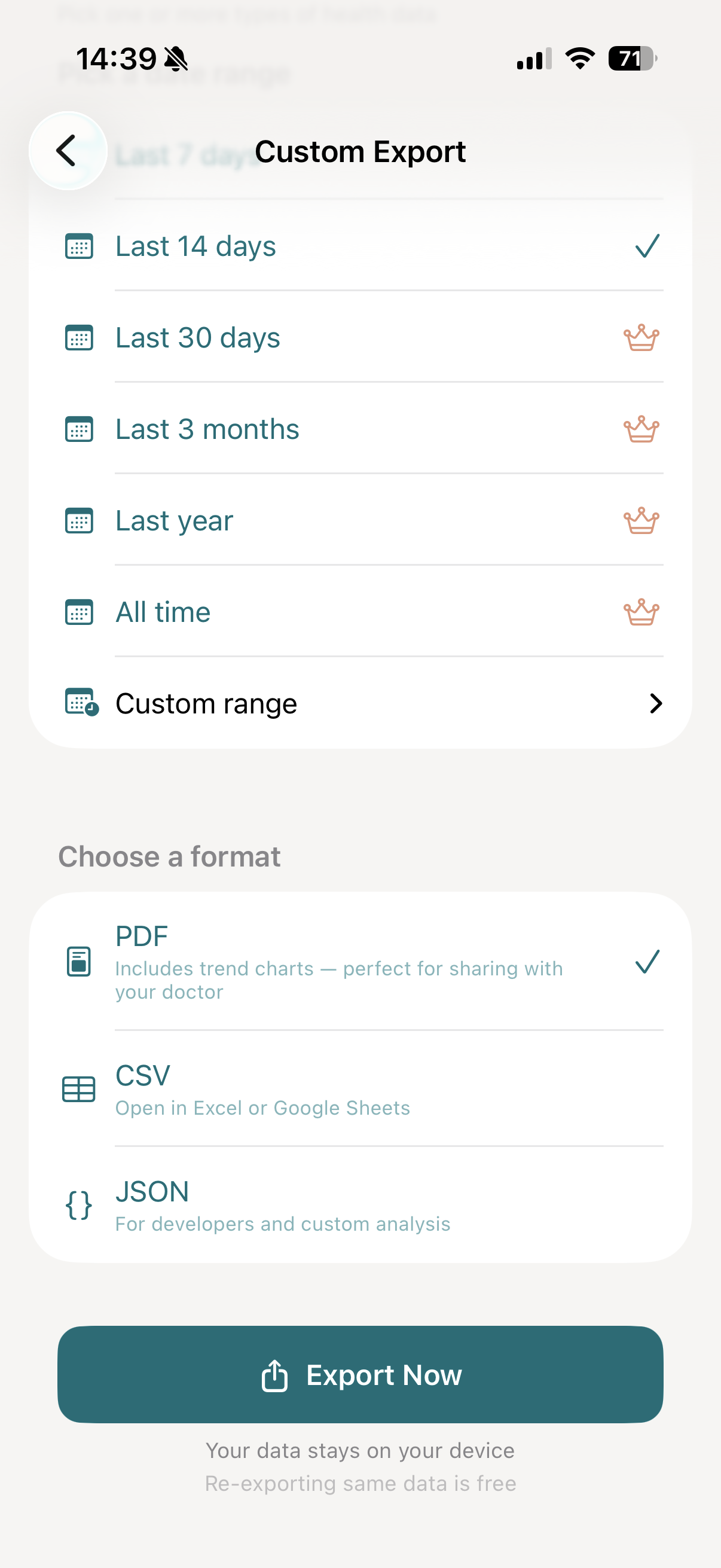
Share with your doctor
Once your export is ready, you'll see a full preview of the file. From here, tap Export to open the iOS share sheet, where you can:
- Email it to your OB-GYN or care team before your appointment
- AirDrop or share via Messages to anyone nearby
- Save to Files on your iPhone or iCloud Drive
- Print a physical copy to bring to the clinic
This is the same flow people use for OB-GYN and well-woman visits, fertility workups and IVF preparation, endometriosis and PCOS diagnosis, perimenopause consultations, postpartum follow-up, and endocrinology appointments where hormonal health needs context from several cycles.
The 14 cycle symptoms you can export
Alongside flow and test results, Apple Health lets you log 14 cycle symptoms. Most aren't just a yes/no - they're recorded with a severity, and vitalina exports that exact value rather than collapsing every entry to a bare occurrence. Each row below shows what the symptom captures and an example of the value you'd see in your export.
| Symptom | What it captures | Example |
|---|---|---|
| Abdominal Cramps | Abdominal cramps you've logged in Apple Health, with their severity. | Moderate |
| Acne | Acne you've logged in Apple Health, with its severity. | Mild |
| Bladder Incontinence | Bladder incontinence you've logged in Apple Health, with its severity. | Mild |
| Bloating | Bloating you've logged in Apple Health, with its severity. | Moderate |
| Breast Pain | Breast pain you've logged in Apple Health, with its severity. | Mild |
| Fatigue | Fatigue you've logged in Apple Health, with its severity. | Moderate |
| Headache | A headache you've logged in Apple Health, with its severity. | Mild |
| Hot Flashes | Hot flashes you've logged in Apple Health, with their severity. | Mild |
| Lower Back Pain | Lower-back pain you've logged in Apple Health, with its severity. | Moderate |
| Mood Changes | Mood changes you've logged in Apple Health, recorded as present or not present. | Present |
| Nausea | Nausea you've logged in Apple Health, with its severity. | Mild |
| Pelvic Pain | Pelvic pain you've logged in Apple Health, with its severity. | Moderate |
| Sleep Changes | Sleep changes you've logged in Apple Health, recorded as present or not present. | Present |
| Vaginal Dryness | Vaginal dryness you've logged in Apple Health, with its severity. | Mild |
How symptom severity is exported
Apple Health doesn't just record that a symptom happened - for most cycle symptoms it stores how severe it was, and vitalina surfaces that exact value. Most use the same five-level severity scale as General Symptoms:
Mood Changes and Sleep Changes are the two exceptions - Apple records them as simply Not Present or Present, and vitalina exports them exactly that way:
Which apps log cycle data to Apple Health?
vitalina exports any cycle data stored in Apple Health, regardless of where it came from. This includes:
- Apple Cycle Tracking - the built-in iPhone and Apple Watch app
- Apple Watch - wrist-based temperature sensing on Series 8, 9, 10, Ultra and Ultra 2 for cycle estimates and retrospective ovulation
- Clue - period and cycle tracking, when Apple Health sync is enabled
- Flo - period tracking and predictions
- Natural Cycles - FDA-cleared fertility awareness
- Ovia - fertility, pregnancy, and parenting
- Stardust - cycle tracking with lunar context
- Manual entries - data entered by hand in the Health app
If the reading appears in Apple Health under Cycle Tracking, vitalina can export it.
Using a different app or device? See how vitalina exports data from any Apple Health app.
How much does vitalina cost?
vitalina is free with 5 unique exports and date ranges up to 14 days. vitalina Pro is a one-time purchase from €3.99 (max €4.99 by region, no subscription) that unlocks unlimited exports, extended date ranges up to all time, and Shortcuts automation. Re-exporting the same configuration is always free.
Frequently asked questions
Can you export cycle tracking data from Apple Health?
Yes. Apple Health stores every piece of cycle data you log - flow, spotting, symptoms, basal body temperature, cervical mucus - but only lets you export everything as an unfiltered XML file. vitalina lets you export just your cycle data as a clean PDF or CSV, for any date range you choose.
What cycle metrics can vitalina export?
Every cycle tracking metric Apple Health supports: menstruation start and end dates, flow level, spotting, symptoms (cramps, bloating, headache, mood changes, and more), basal body temperature, cervical mucus quality, ovulation and pregnancy test results, sexual activity, and cycle factors (pregnancy, lactation, contraceptive use).
What format is best for sharing cycle data with my OB-GYN?
PDF is best for appointments. It includes a cycle timeline, flow summary, basal body temperature chart, and a symptom overview your OB-GYN can read immediately. CSV is better if a fertility specialist wants to do cycle-by-cycle analysis in Excel or another tool.
Is my cycle data safe when I export it?
Yes. vitalina processes everything locally on your iPhone. Nothing is uploaded to any server. There is no account, no cloud storage, and no analytics on your health data. The file stays on your device until you share it.
Does vitalina work with cycle data from Clue, Flo, or Natural Cycles?
Yes - as long as the app syncs to Apple Health, vitalina can export the data. This covers Apple's Cycle Tracking, Apple Watch, Clue, Flo, Natural Cycles, Ovia, Stardust, and any other cycle tracking app with Apple Health integration enabled.
What languages does vitalina support?#
vitalina is fully localized in 7 languages - English, German, Spanish, French, Portuguese (Brazil), Japanese, Russian. The app interface and every Apple Health metric name are translated, so your exports come out in your language. This page is in English, but the app follows your device language with no setup required. For example, Menstrual Flow appears as:
| Language | Menstrual Flow |
|---|---|
| EnglishEnglish | Menstrual Flow |
| GermanDeutsch | Menstruationsfluss |
| SpanishEspañol | Flujo menstrual |
| FrenchFrançais | Flux menstruel |
| Portuguese (Brazil)Português (Brasil) | Fluxo menstrual |
| Japanese日本語 | 月経量 |
| RussianРусский | Менструация |
Keep reading
Other Apple Health export guides
Step-by-step tutorials for every metric vitalina can export.
- Export Blood PressureSystolic and diastolic readings for your cardiologist.
- Export Heart RateResting, active, and HRV for your cardiologist or sports medicine doctor.
- Export Blood GlucoseCGM and fingerstick readings for your endocrinologist.
- Export Sleep DataSleep stages and duration for sleep specialists.
- Export WeightWeight, BMI, and body fat trends for your dietician or GP.
- Export ActivitySteps, distance, and active energy for physical therapy or rehab.
- Export WorkoutsWorkout sessions with duration, calories, and heart rate.
- Export Calories & NutritionDaily calories, macros, vitamins, and minerals for your dietician or nutritionist.
- Export ECGApple Watch ECG strips with waveform, classification, and average heart rate for your cardiologist.
- Export Mental Health (State of Mind)Apple Health mental health logs with valence, emotion labels, and life-context associations for your therapist or psychiatrist.
- Export SymptomsGeneral Symptoms like fever, cough, and dizziness with their severity for your doctor.
- Export MedicationsYour Apple Health medication list and full dose log for your doctor - iOS 26 and later.
- Export Format ReferenceExact CSV columns and JSON schemas, plus a searchable dictionary of every exportable Apple Health metric.
- Export Apps & DevicesRenpho, Omron, Eight Sleep, Stelo, Flo and more - export data from any app that syncs to Apple Health.
- Export ExcelOpen your Apple Health CSV in Excel and build charts or PivotTables - works on Windows, Mac, and iPad.