
Your health data, ready for your doctor
Export Apple Health data to doctor-friendly PDF reports - with built-in trend charts, not a wall of numbers - or to CSV and JSON, in under 2 minutes. No more screenshots. No more manual transcription.
See it in action
Simple by design
Designed for people, not developers. Tap, pick, export.
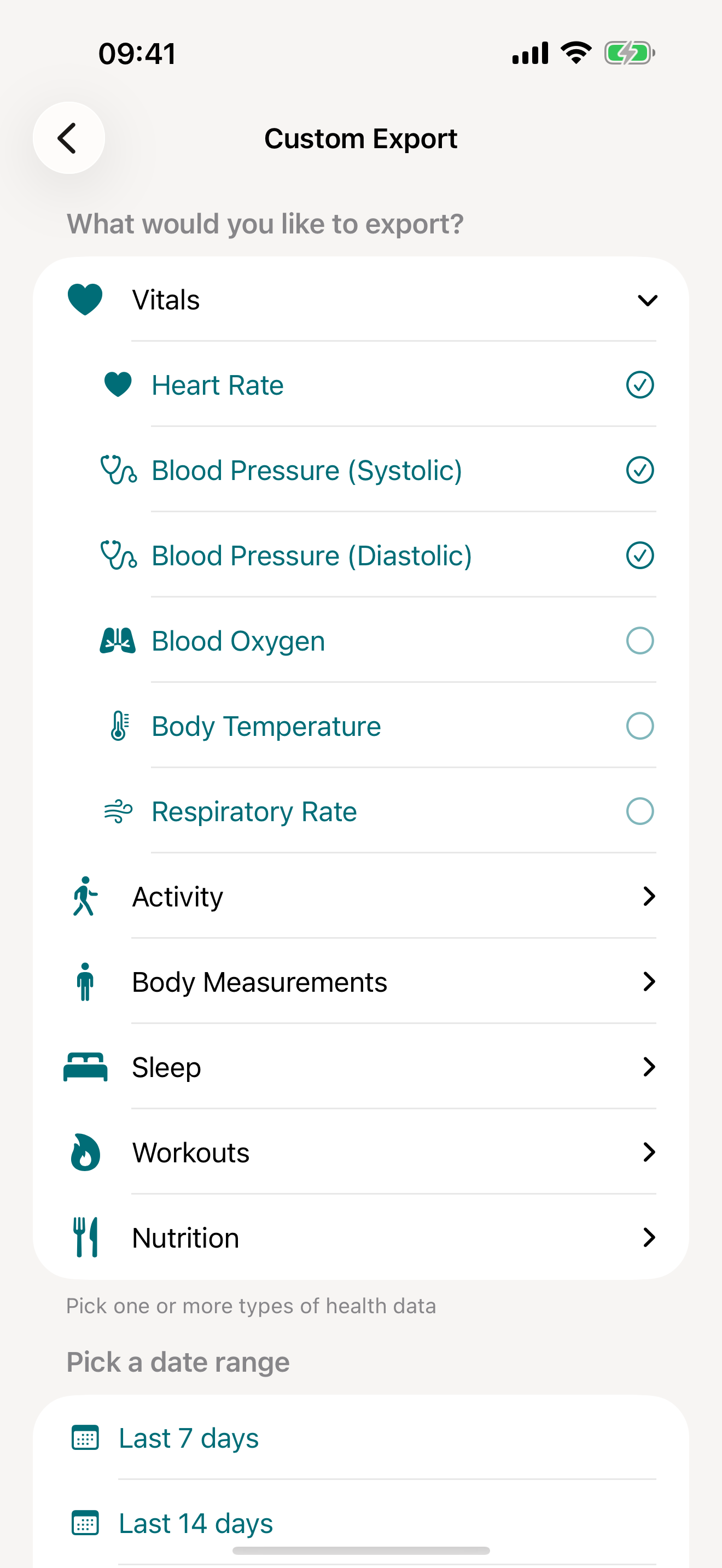
Pick your metrics
Choose from 100+ health metrics across 11 categories
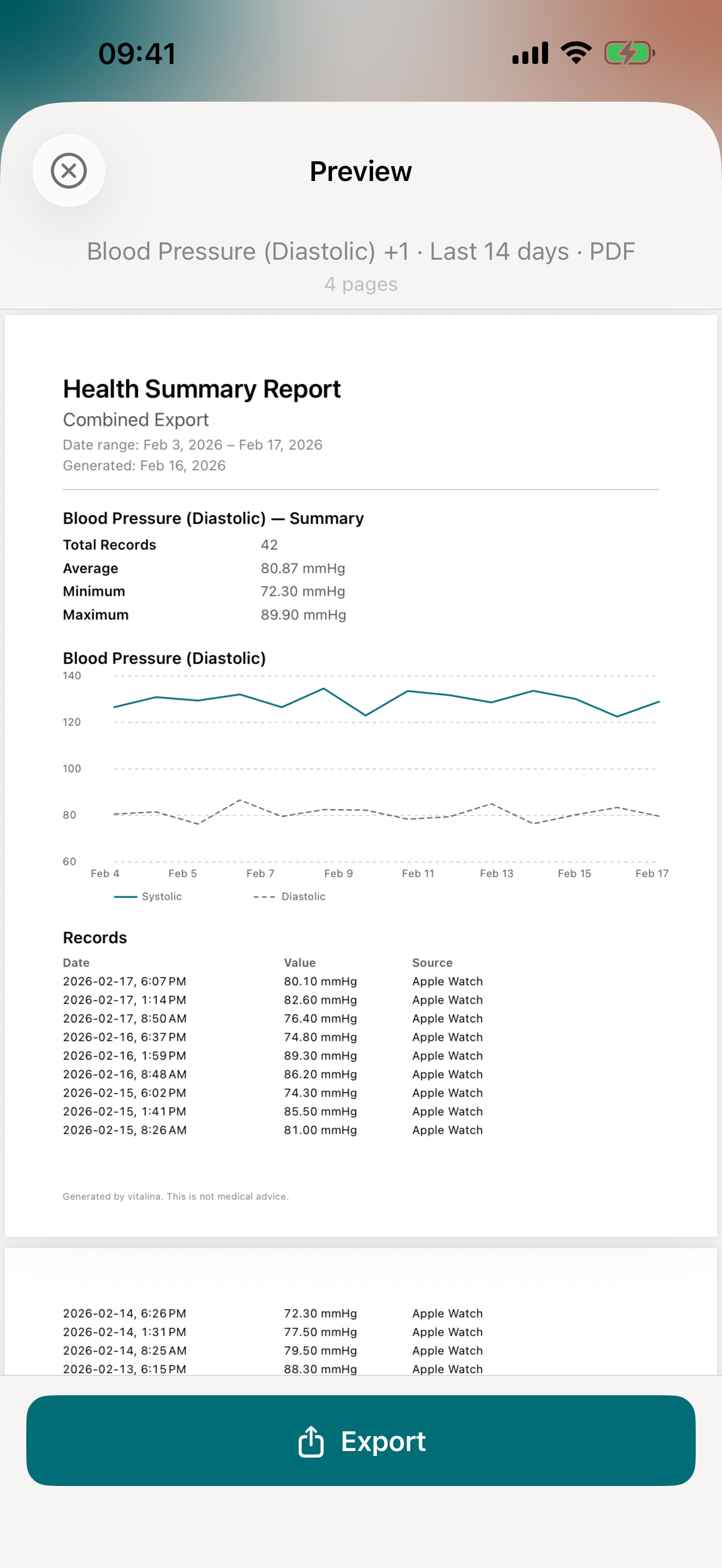
PDF report preview
Doctor-friendly formatting with trend charts
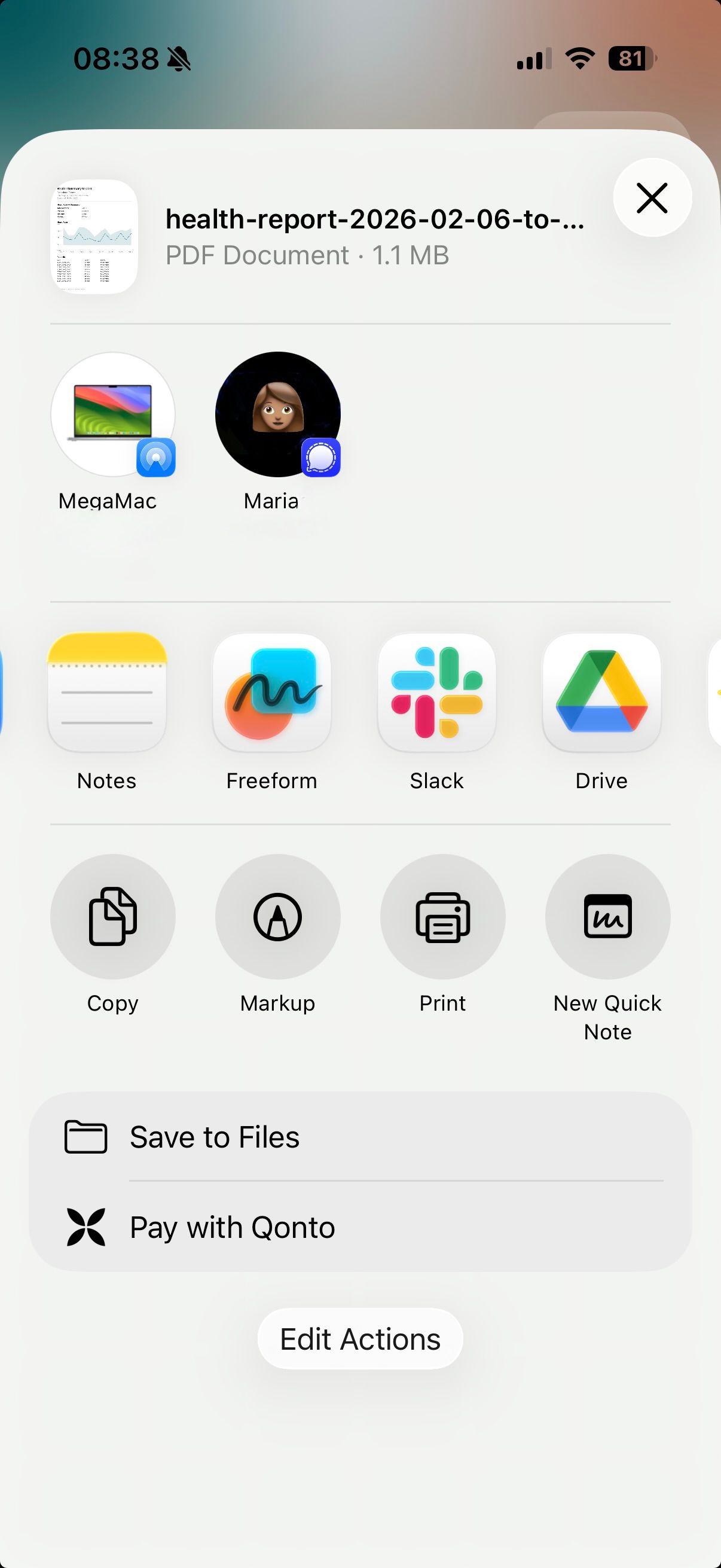
Export & share
Send via AirDrop, email, Messages, or save to Files
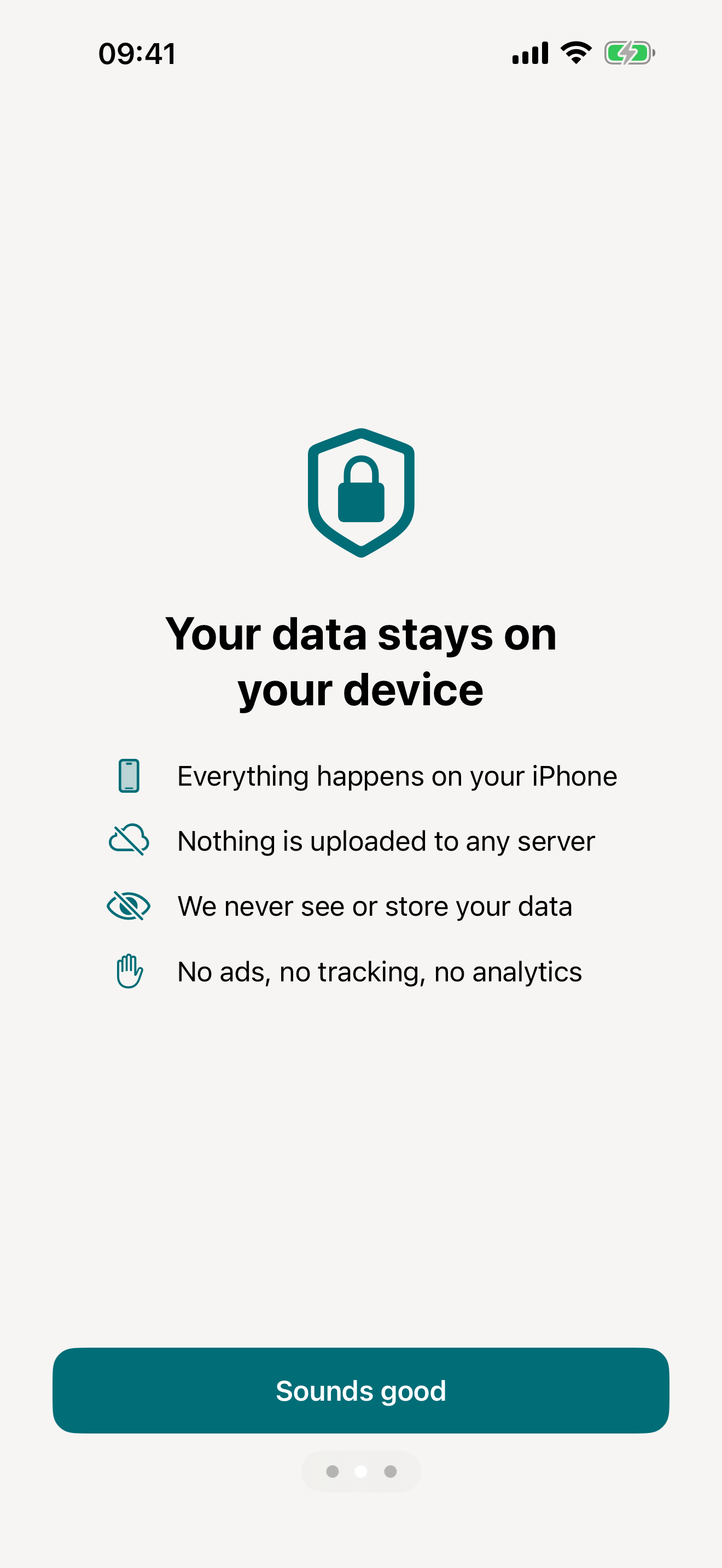
Your data stays yours
No collection, no tracking, ever
The problem
Getting data out of Apple Health is unreasonably hard
vitalina fixes what Apple won't.
Features
Everything you need to share your health data
Doctor-friendly PDF reports
Clean, formatted reports your doctor can read at a glance. No more handing over raw data or screenshots.
Custom date ranges
Pick "last 30 days" or set exact dates. Export only what matters for your next appointment.
Complete sleep & workout data
Sleep stages, duration, REM and deep sleep, heart rate zones, workout summaries. All the data competitors miss.
Blood pressure, cardiac & metabolic vitals
Export blood pressure, glucose, insulin delivery, HRV, AFib burden, walking heart rate, and heart rate recovery. Perfect for chronic condition management.
Scheduled automated exports
Set up daily, weekly, or monthly exports that run automatically - with Siri Shortcuts. Your data, always ready.
Shortcuts setup guideYour data stays on your device
No cloud uploads. No accounts. Your health data never leaves your phone unless you choose to share it.
How it works
From Apple Health to your doctor in 3 simple steps
Pick your metrics
Choose from 100+ health metrics across 11 categories - vitals, activity, mobility, body measurements, sleep, workouts, nutrition, cycle tracking, general symptoms, mental health, and medications.
Pick a date range
Select "last 7 days", "last 30 days", "last 3 months", or set a custom range for your next appointment.
Export & share
Get a clean PDF, CSV, or JSON file. Share it directly with your doctor via email or AirDrop.
Use cases
Export exactly what you need, nothing more
Step-by-step guides for the most common health data exports.
Export Blood Pressure
Systolic and diastolic readings as a clean PDF with trend charts - ready to share with your cardiologist.
Export Heart Rate
Resting and active heart rate, HRV, and more - as a PDF for your cardiologist or sports medicine doctor.
Export Blood Glucose
CGM and fingerstick readings with time-in-range - ready for your endocrinologist or diabetes educator.
Export Sleep Data
Sleep stages, duration, and time in bed - for sleep specialists, CPAP follow-ups, or insomnia treatment.
Export Weight Data
Weight, BMI, and body composition from any smart scale - for your dietician, endocrinologist, or OB-GYN.
Export Activity Data
Steps, distance, active energy, and stand hours - for physical therapy or cardiac rehab progress.
Export Workouts
Workout sessions with duration, type, calories, and heart rate - for sports medicine or your coach.
Export Cycle Tracking
Period flow, spotting, cramps, basal body temperature, and symptoms - for your OB-GYN, endocrinologist, or fertility specialist.
Export Calories & Nutrition
Daily calories, macros, vitamins, and minerals from Yazio, MyFitnessPal, Cronometer, or any food tracker - for your dietician or nutritionist.
Export ECG
Apple Watch ECG strips with waveform, classification, average heart rate, and sampling frequency - on a clinical red grid for your cardiologist.
Export Mental Health (State of Mind)
Apple Health mental health logs - momentary emotions, daily moods, valence, emotion labels, and life-context associations - as a PDF for your therapist or psychiatrist.
Export Symptoms
General Symptoms like fever, cough, shortness of breath, and dizziness - each with the severity you recorded - as a PDF for your doctor.
What to do with your data once it is exported
Pricing
Start free, upgrade once
We hate subscriptions. Pro is a fair, one-time purchase - never more than €4.99 - and your data and your purchase stay yours forever.
Free
0 €
Forever
- 5 unique exports
- PDF, CSV & JSON formats
- Date ranges up to 14 days
- All 100+ health metrics
- Re-export same data and ranges for free
Pro
from 3,99 €
One-time purchase · max €4.99 · varies by region
- Unlimited exports
- Date ranges up to all time
- Siri Shortcuts automation
- Yours forever - no subscription
- Everything in Free

Our story
Built by two people who just wanted their own data
We're Marina and Martin - a married couple from Dresden who have worn an Apple Watch since 2015. Neither of us could get our own data out of Apple Health without wrestling a giant XML file, and every app that promised to help wanted a subscription. So we built the one we wanted: no account, no cloud, everything stays on your phone.
Read our story →FAQ
Common questions
What health data can I export?
vitalina supports 100+ health metrics across 11 categories: vitals (heart rate, resting and walking heart rate, heart rate variability (HRV), heart rate recovery, AFib burden, blood pressure, blood glucose, insulin delivery, blood oxygen, body temperature, respiratory rate, VO2 Max, ECG), activity (steps, distance, flights climbed, active energy, exercise minutes, stand time), mobility (walking speed, walking steadiness, step length, stair speeds), body measurements (weight, height, BMI, body fat percentage, lean body mass, waist circumference), sleep analysis, workouts, nutrition (calories, macros, vitamins, minerals, water), cycle tracking, general symptoms, mental health (State of Mind, mindful minutes), and medications (your medication list with logged doses, on iOS 26 or later).
Can vitalina export my medications?
Yes — on iOS 26 or later. Apple first opened medication data to apps with the iOS 26 HealthKit Medications API, and vitalina Pro uses it to export the medications you track in Apple Health, including your full dose log, in every PDF, CSV, and JSON export. You choose exactly which medications to share, per medication. On older iOS versions no app can read medication data; there you can use Apple’s built-in option instead: open the Health app, go to Medications, and choose Export Medications List PDF.
What export formats are available?
You can export to PDF (includes trend charts - perfect for sharing with your doctor), CSV (open in Excel or Google Sheets), and JSON (for developers and custom analysis). Each format is optimized for its use case.
Is my health data safe?
Absolutely. Your data never leaves your device unless you explicitly share it. There are no cloud uploads, no sign-up required, and no tracking. vitalina processes everything locally on your iPhone.
Will my doctor understand the PDF report?
Yes. The PDF reports are designed specifically for clinical use, with clear formatting, date ranges, and units your doctor expects. No technical knowledge needed to read them.
Is vitalina free? What does Pro include?
vitalina is free with 5 unique exports, all formats, and date ranges up to 14 days. Pro is a one-time purchase from €3.99 (max €4.99 by region, no subscription) that unlocks unlimited exports, extended date ranges up to all time, and scheduled automated exports. Re-exporting the same data is always free.
Which iPhones are supported?
vitalina requires iOS 18.0 or later. It works on any iPhone that runs iOS 18, including iPhone XS and newer models.
What languages does vitalina support?
vitalina is fully localized in 7 languages - English, German, Spanish, French, Portuguese (Brazil), Japanese, Russian. The app interface and every Apple Health metric name are translated, so your exports come out in your language. For example, Heart Rate appears as Herzfrequenz (German), Frecuencia cardíaca (Spanish), Fréquence cardiaque (French), Frequência cardíaca (Portuguese (Brazil)), 心拍数 (Japanese), Пульс (Russian). This page is written in English, but the app itself follows your device language, with no setup required.
Looking for something more specific? See the full FAQ - exports, Shortcuts, health-data access, and more.
Ready to share your health data the easy way?
Download vitalina and have your first report ready before your next doctor visit.