
How to Export Sleep Data from Apple Health
Last updated: April 19th, 2026

By Martin
Co-founder, vitalina
Apple Health stores every night of sleep your Apple Watch, Oura Ring, AutoSleep, or other connected tracker records - including sleep stages like REM, Deep, and Core, plus total sleep duration and time in bed. But when a sleep specialist, neurologist, or pulmonologist asks for your sleep history, getting that data out in a usable format is not straightforward.
This guide shows you how to export your sleep data as a clean PDF or CSV file using vitalina, a free iPhone app that reads your Apple Health data and generates doctor-ready reports in under two minutes - ideal for sleep clinic evaluations, CPAP therapy titration check-ins, insomnia treatment progress, or a sleep apnea workup.
Why Apple Health's built-in export does not work for sleep
Apple Health does let you export your data as XML, but the result is a single file containing every health data point your iPhone has ever recorded. There is no way to filter by metric, so your sleep sessions are buried alongside steps, heart rate, nutrition, and everything else. There is also no date range control - you cannot ask for just the last three months of nights. The file is not readable by a human, and there are no charts, stage breakdowns, or summaries.
Apple doesn't hand you the XML directly either. You get an Export.zip archive that you have to unzip on a computer. Inside is a folder called apple_health_export, and the full Export.xml sits inside it alongside supporting files. For long-time Apple Watch users that XML can easily reach 2.9 GB - 11 years of continuous health data in one file.
If you have been tracking sleep with an Apple Watch for more than a few weeks, even that slice of the export runs to hundreds of megabytes. It is not something you can email to a sleep clinic or review before a consultation.
vitalina solves this by reading your Apple Health data locally on your iPhone and letting you export just your sleep data - for any date range you choose - as a PDF or CSV.
What you'll need
- An iPhone running iOS 18 or later
- Sleep data recorded in Apple Health (from an Apple Watch, Oura, AutoSleep, Pillow, Sleep Cycle, Whoop, Withings Sleep, or manual bedtime entries)
The walkthrough · 8 steps · ~2 min
How to export sleep data, step by step
Download vitalina
Download vitalina from the App Store. It's free to use with no account or sign-up required.
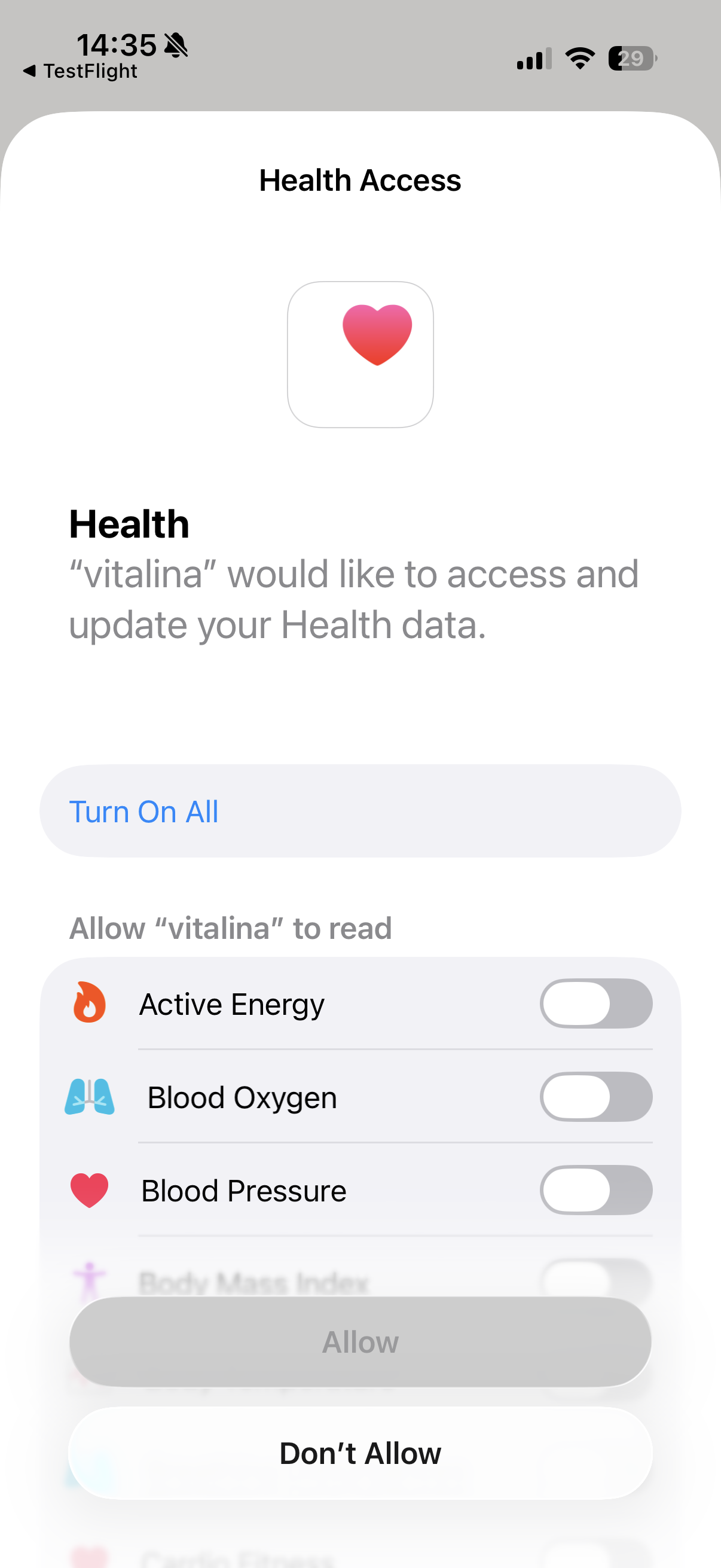
Allow access to Apple Health
When you first open vitalina, tap Allow Health Access and confirm the permissions in the Apple Health prompt. vitalina only requests read access - it cannot modify or delete your health data.
Your data never leaves your device. vitalina processes everything locally on your iPhone with no cloud uploads, no tracking, and no analytics.
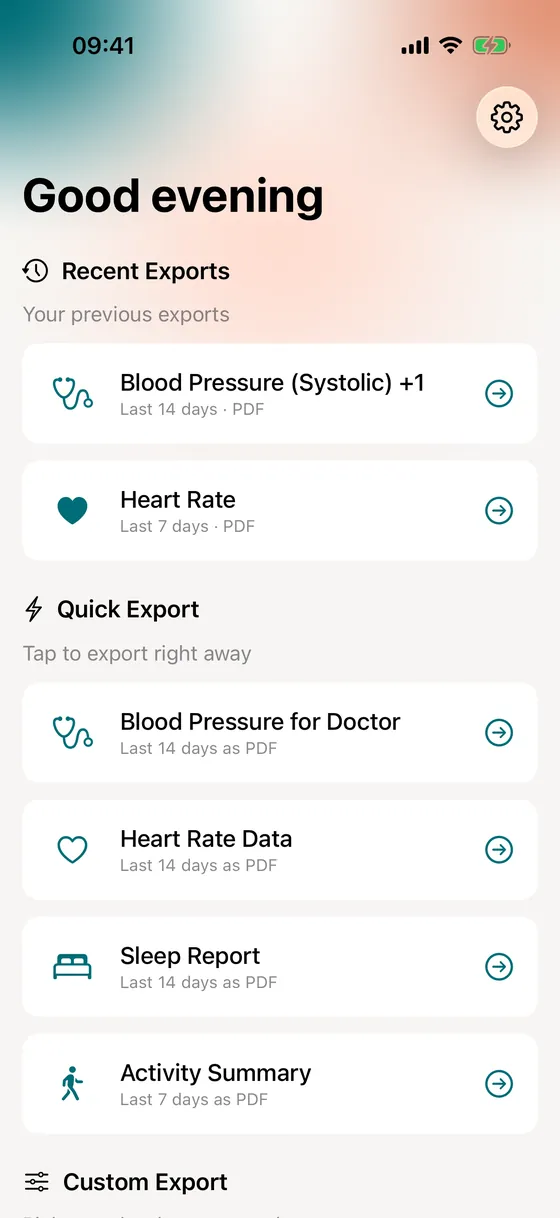
Tap the "Sleep Report" quick export
On the main screen, you'll see a set of one-tap Quick Export templates. Tap Sleep Report to export your sleep for the last 14 days as a PDF, ready to share. How Quick Exports work.
If you prefer full control over the date range and format, tap Create Custom Export instead. The rest of this guide walks through the custom export flow.
Select sleep data
In a custom export, you'll see all available health metrics grouped by category. Under Sleep, select Sleep Analysis. This exports sleep stages (REM, Deep, Core, and Awake), total sleep duration, and time in bed for each night.
You can also add related metrics at this step - for example, Heart Rate, Respiratory Rate, or Blood Oxygen - if your sleep specialist wants a broader picture for a suspected sleep apnea workup or CPAP titration review.
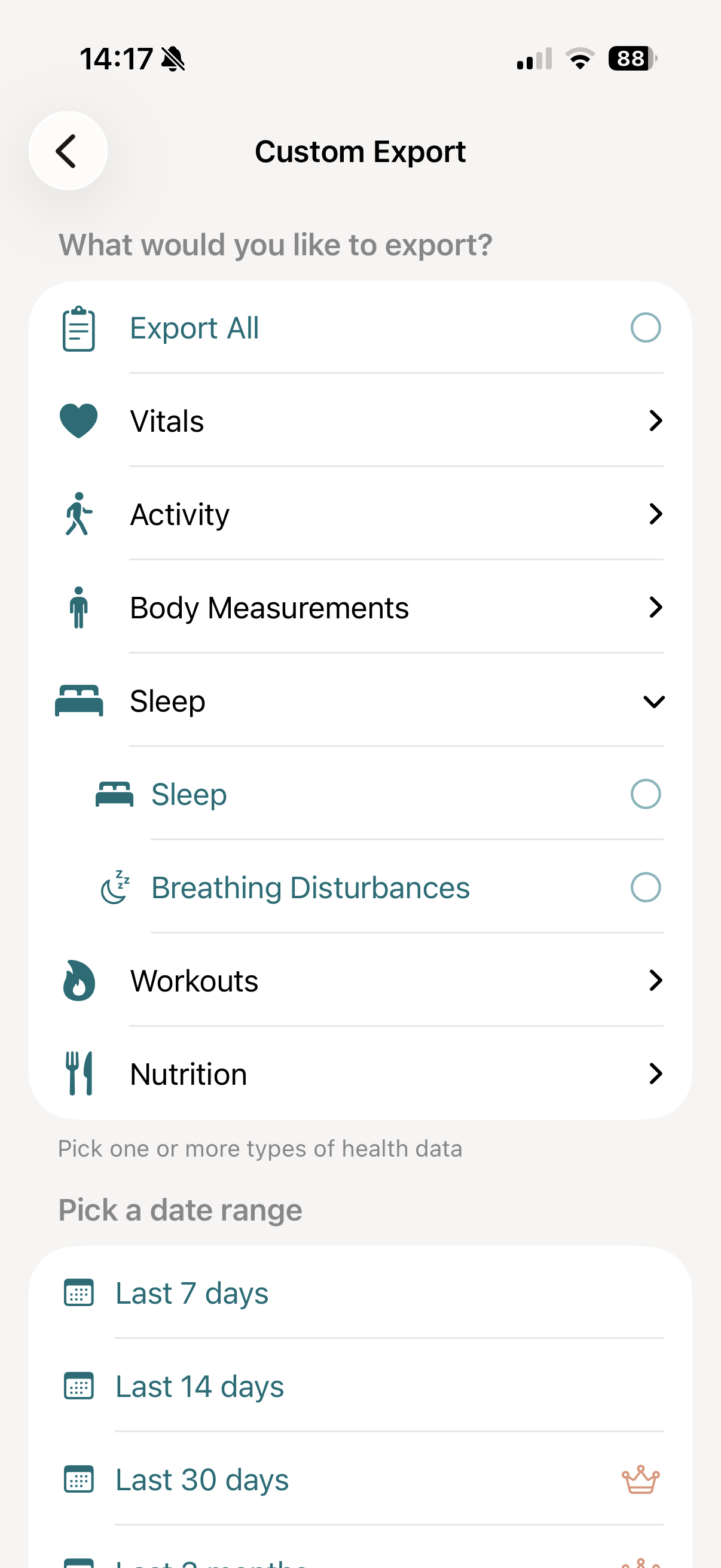
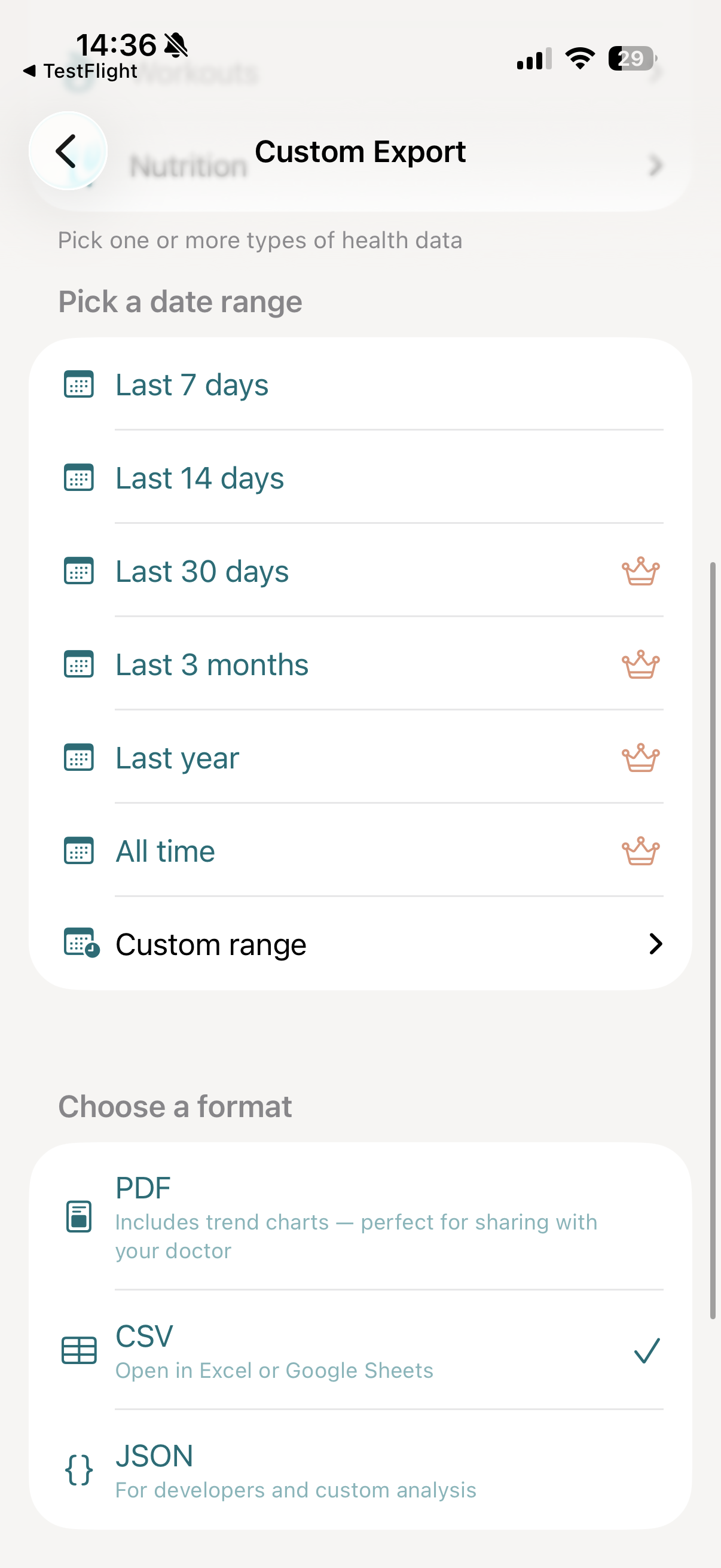
Pick a date range
This is where vitalina makes a real difference over Apple's native export. You can choose exactly how many nights to include:
- Last 7 days and Last 14 days - available for free
- Last 30 days, 3 months, 1 year, and All time - available with vitalina Pro
- Custom date range - pick any exact start and end date with Pro
If your sleep specialist has asked for several months of nightly data before a formal sleep study, or if you are tracking insomnia treatment progress over time, the Pro upgrade is a one-time purchase that unlocks all extended date ranges.
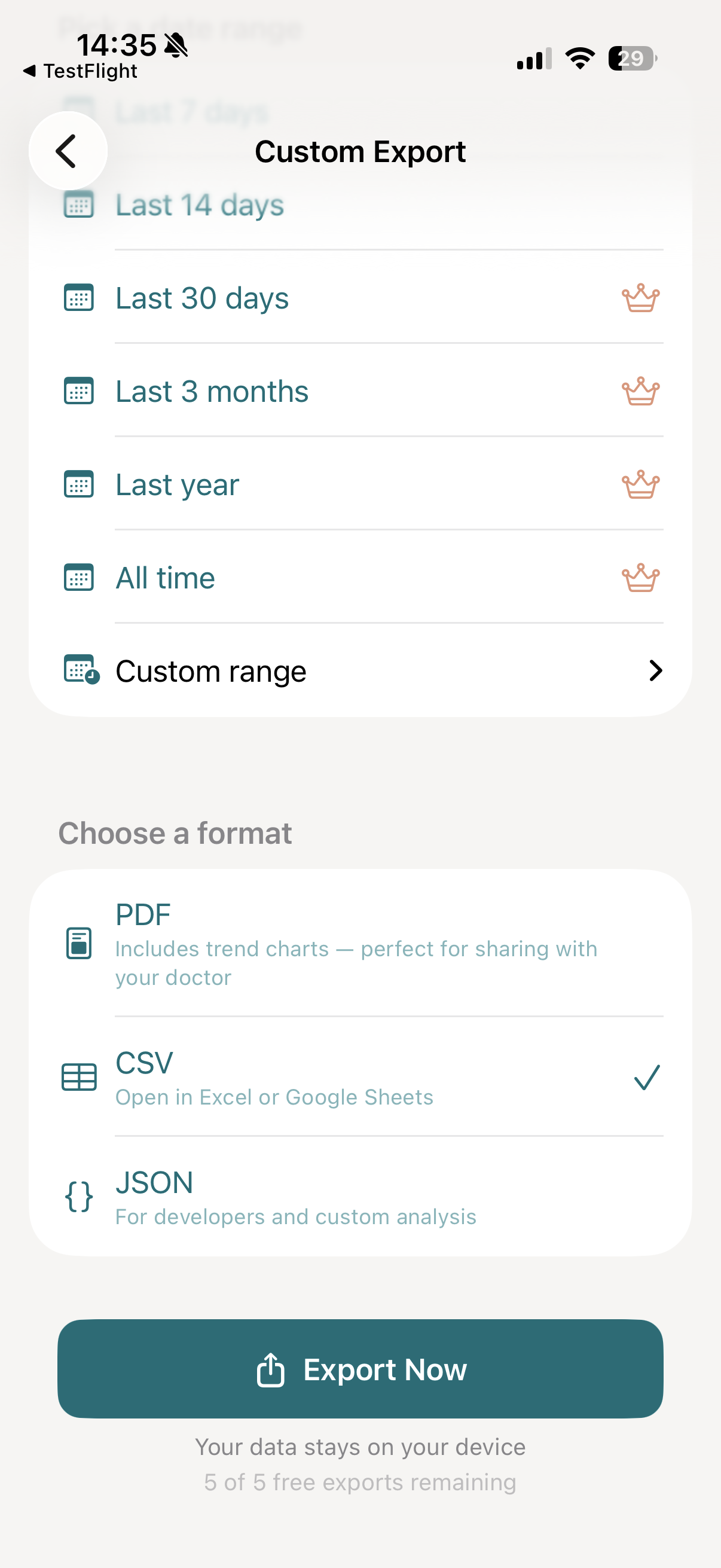
Choose your export format
For sleep data, two formats are most useful:
- PDF: The best format for appointments with a sleep specialist, neurologist, or pulmonologist. Includes a sleep-stage breakdown (REM, Deep, Core, Awake), nightly duration trends, and clean formatting your doctor can read without any technical knowledge. You can email it, AirDrop it, or print it before your appointment.
- CSV: Opens in Excel or Google Sheets. Ideal for detailed night-by-night analysis, building your own charts, or importing the data into another tool.
Both formats are available for free.
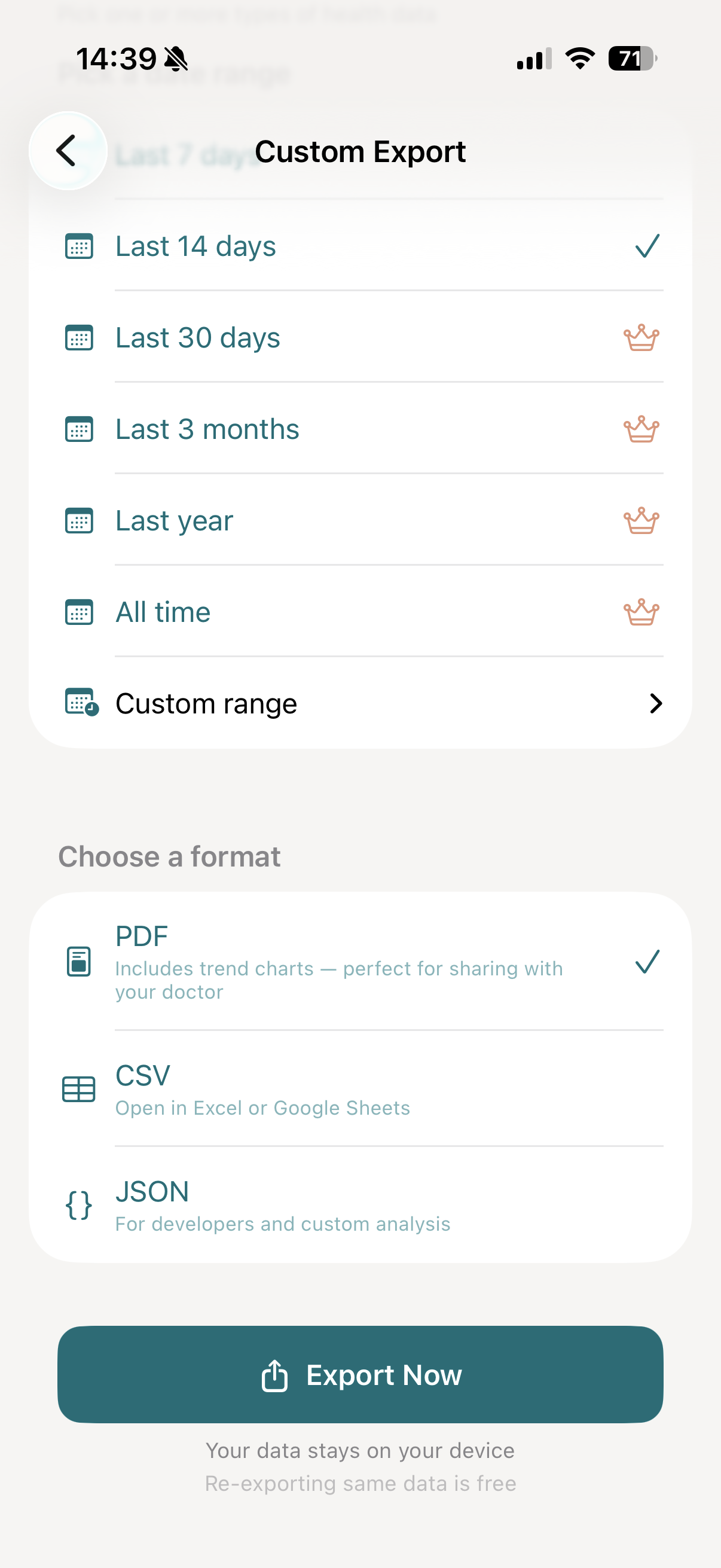
Tap "Export Now"
Tap Export Now. vitalina reads your sleep data from Apple Health, formats the export, and generates your file - usually within a few seconds.
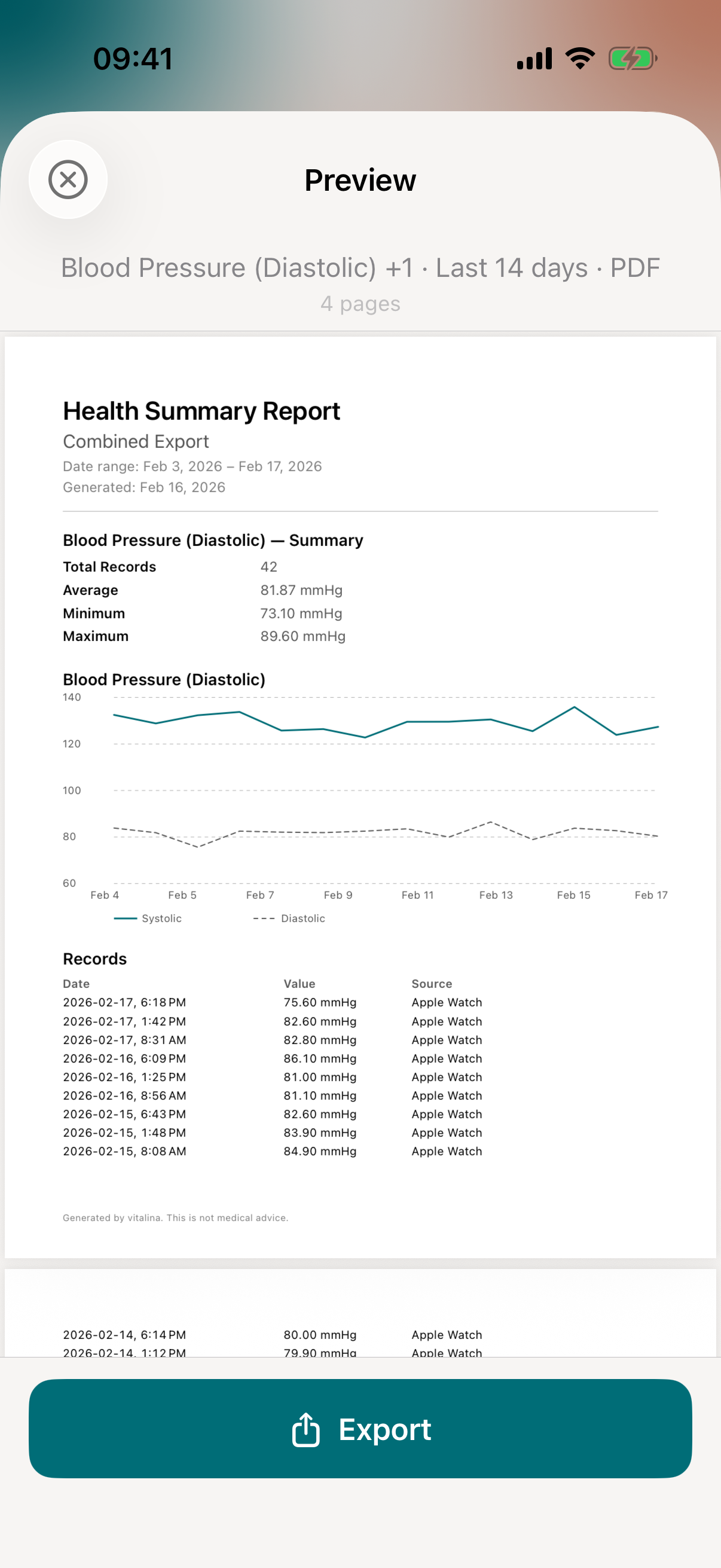
Share with your sleep specialist
Once your export is ready, you'll see a full preview of the file. From here, tap Export to open the iOS share sheet, where you can:
- Email it to your sleep clinic or care team before your appointment
- AirDrop or share via Messages to anyone nearby
- Save to Files on your iPhone or iCloud Drive
- Print a physical copy to bring to the sleep clinic
Which devices and apps sync sleep data to Apple Health?
vitalina exports any sleep data stored in Apple Health, regardless of where it came from. This includes:
- Apple Watch - native sleep tracking with sleep stages (requires watchOS 9 or later)
- AutoSleep - popular third-party sleep tracker for Apple Watch
- Pillow - automatic and manual sleep tracking on iPhone and Apple Watch
- Sleep Cycle - iPhone-based sleep tracking with smart alarm
- Eight Sleep - Pod cover sleep and temperature data via the Eight Sleep app
- Sleep Number - SleepIQ data when synced to Apple Health
- Oura Ring - via the Oura Health app
- Whoop - via third-party sync tools
- Withings Sleep - the mat that goes under the mattress
- Manual entries - bedtime and wake time logged by hand in the Health app
If the session appears in Apple Health under Sleep, vitalina can export it. This matters for sleep specialists treating insomnia, suspected sleep apnea, shift-work sleep disorder, or neurological conditions like Parkinson's or dementia where sleep quality is a clinical signal.
Using a different app or device? See how vitalina exports data from any Apple Health app.
How much does vitalina cost?
vitalina is free with 5 unique exports and date ranges up to 14 days. vitalina Pro is a one-time purchase from €3.99 (max €4.99 by region, no subscription) that unlocks unlimited exports, extended date ranges up to all time, and Shortcuts automation. Re-exporting the same configuration is always free.
Frequently asked questions
Can you export sleep data from Apple Health?
Yes. Apple Health stores every sleep session recorded by your Apple Watch or a third-party app, but the native XML export is unreadable. vitalina extracts just your sleep stages and durations and exports them as a clean PDF or CSV - for any date range you choose.
Can I export more than two weeks of sleep history?
Yes, with vitalina Pro. The free tier covers up to 14 days. Pro (a one-time purchase) unlocks 30 days, 3 months, 1 year, and all-time sleep history - important for sleep specialists who want multi-month trend data before a formal sleep study or during CPAP titration.
What format should I use to share sleep data with my sleep doctor?
PDF is best for appointments with a sleep specialist, neurologist, or pulmonologist. It includes a sleep-stage breakdown and duration trends your doctor can read immediately. CSV is better for detailed night-by-night analysis in Excel or Google Sheets.
Is my sleep data safe when I export it?
Yes. vitalina processes everything locally on your iPhone. Nothing is uploaded to any server. There is no account, no cloud storage, and no analytics on your health data. The file stays on your device until you share it.
Does vitalina work with sleep data from any source?
Yes - vitalina exports any sleep session stored in Apple Health, so it works with Apple Watch, AutoSleep, Pillow, Sleep Cycle, Oura, Whoop, Withings Sleep, or manual bedtime entries.
What languages does vitalina support?#
vitalina is fully localized in 7 languages - English, German, Spanish, French, Portuguese (Brazil), Japanese, Russian. The app interface and every Apple Health metric name are translated, so your exports come out in your language. This page is in English, but the app follows your device language with no setup required. For example, Sleep Analysis appears as:
| Language | Sleep Analysis |
|---|---|
| EnglishEnglish | Sleep Analysis |
| GermanDeutsch | Schlafanalyse |
| SpanishEspañol | Análisis de sueño |
| FrenchFrançais | Analyse du sommeil |
| Portuguese (Brazil)Português (Brasil) | Análise do sono |
| Japanese日本語 | 睡眠分析 |
| RussianРусский | Анализ сна |
Keep reading
Other Apple Health export guides
Step-by-step tutorials for every metric vitalina can export.
- Export Blood PressureSystolic and diastolic readings for your cardiologist.
- Export Heart RateResting, active, and HRV for your cardiologist or sports medicine doctor.
- Export Blood GlucoseCGM and fingerstick readings for your endocrinologist.
- Export WeightWeight, BMI, and body fat trends for your dietician or GP.
- Export ActivitySteps, distance, and active energy for physical therapy or rehab.
- Export WorkoutsWorkout sessions with duration, calories, and heart rate.
- Export Cycle TrackingPeriod flow, spotting, cramps, and basal body temperature for your OB-GYN.
- Export Calories & NutritionDaily calories, macros, vitamins, and minerals for your dietician or nutritionist.
- Export ECGApple Watch ECG strips with waveform, classification, and average heart rate for your cardiologist.
- Export Mental Health (State of Mind)Apple Health mental health logs with valence, emotion labels, and life-context associations for your therapist or psychiatrist.
- Export SymptomsGeneral Symptoms like fever, cough, and dizziness with their severity for your doctor.
- Export MedicationsYour Apple Health medication list and full dose log for your doctor - iOS 26 and later.
- Export Format ReferenceExact CSV columns and JSON schemas, plus a searchable dictionary of every exportable Apple Health metric.
- Export Apps & DevicesRenpho, Omron, Eight Sleep, Stelo, Flo and more - export data from any app that syncs to Apple Health.
- Export ExcelOpen your Apple Health CSV in Excel and build charts or PivotTables - works on Windows, Mac, and iPad.