
Export Apple Health Data to PDF
Doctor-ready reports with trend charts and tables

Last updated: April 20th, 2026

By Martin
Co-founder, vitalina
Your doctor asks for your heart rate history. Your endocrinologist wants three months of blood glucose readings. Your OB-GYN needs your blood pressure trend from the last trimester. The data is all in Apple Health - but Apple's only export option is a massive XML file that no doctor can read.
vitalina solves this by exporting your Apple Health data as clean, formatted PDF reports - with trend charts, timestamped tables, and clear units your doctor expects. No cloud upload, no account, everything processed locally on your iPhone.
What's in a vitalina PDF report?
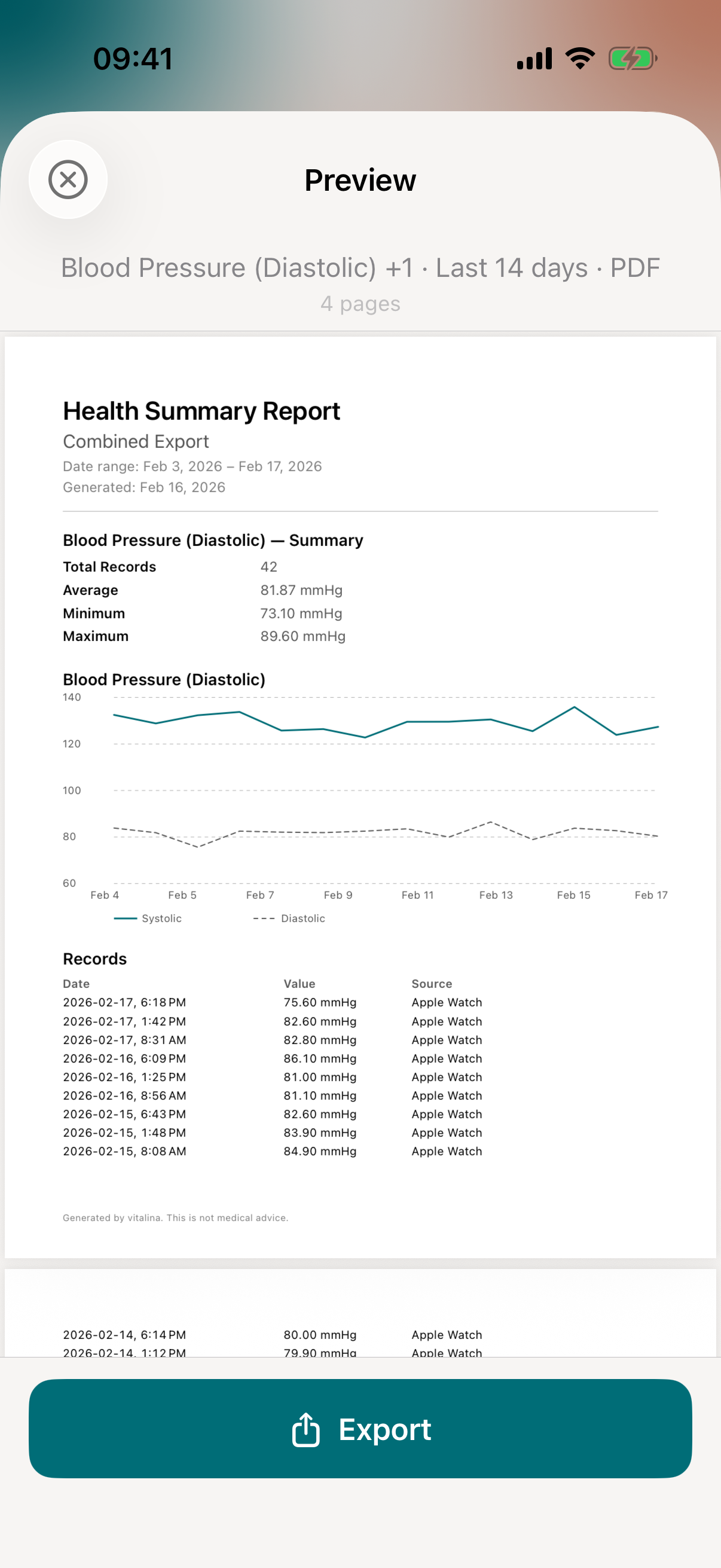
Each PDF report is designed for clinical use. Your doctor can read it at a glance - no technical knowledge needed. Every report includes:
- Trend charts - visual graphs showing how your values change over the selected date range. Heart rate trends, blood pressure trajectories, weight curves - all clearly labeled
- Complete data tables - every reading with timestamp, value, and unit. Sorted chronologically so your doctor can trace patterns
- Standard medical units - bpm for heart rate, mmHg for blood pressure, mg/dL for glucose, kg or lbs for weight. The units your care team already works with
- Clean layout - formatted for A4 and US Letter paper. Print it, email it, or show it on your phone during the appointment
Sample PDF Report - Heart Rate
14 days of heart rate data with trend chart, summary stats, and readings table.
Who uses PDF export?
- Cardiology patients - heart rate history, resting heart rate trends, blood pressure readings for AFib review or medication adjustments
- Diabetes management - blood glucose readings for endocrinologist visits
- Pregnancy monitoring - blood pressure, resting heart rate, and weight trends for OB-GYN appointments
- Sleep clinic referrals - sleep stage breakdowns, duration trends, and sleeping heart rate for sleep specialists
- Post-surgery follow-ups - recovery trends in heart rate, activity levels, and weight for your surgeon
- Annual physicals - a year of vitals at a glance for your GP
How to export Apple Health data as PDF
Step 1: Download vitalina
Download vitalina from the App Store. It's free with no account or sign-up.
Step 2: Allow access to Apple Health
Tap Allow Health Access and confirm the permissions. vitalina only requests read access - it cannot modify your data. Everything is processed locally on your iPhone.
Step 3: Choose a quick export or select metrics manually
For the fastest path, use one of the Quick Export templates on the main screen - like Blood Pressure for Doctor or Heart Rate Data. These are pre-configured with the right metrics and PDF format. See every Quick Export template.
For full control, tap Create Custom Export and pick from 100+ health metrics across 11 categories.
Step 4: Pick a date range
Choose Last 7 days or Last 14 days for free, or upgrade to vitalina Pro for 30 days, 3 months, 1 year, all-time history, or a custom date range. For most doctor visits, 30 days or 3 months covers what your care team needs.
Step 5: Select PDF as your format
In the format picker, tap PDF. This is the format designed for doctor appointments - with trend charts, tables, and clean formatting.
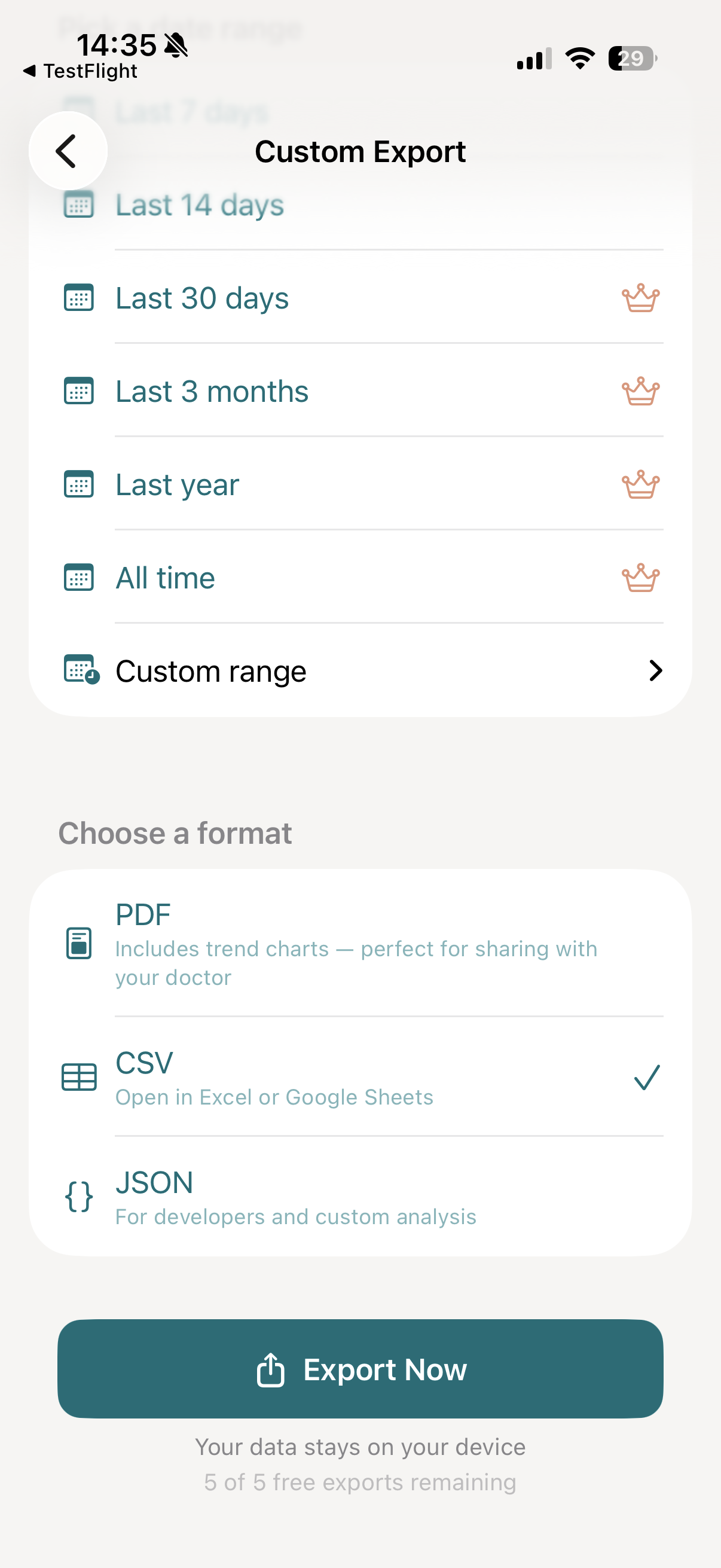
Step 6: Tap Export Now
Tap Export Now. vitalina reads your Apple Health data and generates a formatted PDF report - usually within a few seconds, even for months of data.
Step 7: Share with your doctor
Preview the full report on your phone, then tap Export to open the iOS share sheet. From there you can:
- Email it to your doctor or care team before your appointment
- AirDrop or Messages to share instantly with someone nearby
- Print a physical copy to bring to the clinic
- Save to Files or iCloud Drive for your records
PDF vs CSV vs JSON - which format should you use?
PDF - for doctors and appointments
Best when you need to share a report with your doctor. Includes trend charts, formatted tables, and clean layout your care team can read immediately. Print it, email it, or show it on your phone.
CSV - for spreadsheets and data analysis
Best when you want to open your health data in Excel, Google Sheets, or Numbers. Create charts, pivot tables, or filter by date. Learn more about CSV export →
JSON - for developers and automation
Best for developers building custom dashboards, data pipelines, or automated analysis. Structured format with nested objects. Learn more about JSON export →
How much does PDF export cost?
vitalina is free with 5 unique exports, all three formats (PDF, CSV, JSON), and date ranges up to 14 days. vitalina Pro is a one-time purchase from €3.99 (max €4.99 by region, no subscription) that unlocks unlimited exports, extended date ranges up to all time, and Shortcuts automation. Re-exporting the same configuration is always free.
Frequently asked questions
Can you export Apple Health data to PDF?
Yes. Apple Health's built-in export only produces an unfiltered XML dump. vitalina lets you pick specific metrics and date ranges and export them as a clean, formatted PDF report with trend charts and tables - ready to share with your doctor.
What does the PDF report include?
Each report includes a summary header, trend charts showing how your values change over time, a complete table of readings with timestamps and units, and your export date. The layout is designed specifically for medical professionals.
Will my doctor understand the report?
Yes. The reports use standard medical units (bpm, mmHg, mg/dL), clear date formatting, and a simple layout that any healthcare professional can read immediately. No technical knowledge required.
Can I print the PDF report?
Yes. After exporting, tap the share button and select Print. The PDF is formatted for standard A4 and US Letter paper sizes. You can also save it and print from a computer.
Is the PDF export free?
Yes. PDF export is available for free with up to 5 unique exports and date ranges up to 14 days. vitalina Pro (a one-time purchase, no subscription) unlocks unlimited exports and extended date ranges up to all time.
Is my health data safe when I export to PDF?
Yes. vitalina processes everything locally on your iPhone. Nothing is uploaded to any server. There is no account, no cloud storage, and no analytics. The PDF stays on your device until you choose to share it.
What languages does vitalina support?#
vitalina is fully localized in 7 languages - English, German, Spanish, French, Portuguese (Brazil), Japanese, Russian. The app interface and every Apple Health metric name are translated, so your exports come out in your language. This page is in English, but the app follows your device language with no setup required. For example, Heart Rate appears as:
| Language | Heart Rate |
|---|---|
| EnglishEnglish | Heart Rate |
| GermanDeutsch | Herzfrequenz |
| SpanishEspañol | Frecuencia cardíaca |
| FrenchFrançais | Fréquence cardiaque |
| Portuguese (Brazil)Português (Brasil) | Frequência cardíaca |
| Japanese日本語 | 心拍数 |
| RussianРусский | Пульс |
Need machine-readable data instead?
PDF is built for clinicians. If you'd rather analyze your data, the Export Format Reference documents vitalina's CSV columns and JSON schemas in full, alongside a searchable dictionary of every exportable Apple Health metric.
Export guides by metric
Step-by-step tutorials for exporting specific health metrics from Apple Health.
- Export Heart RateResting, active, and HRV for your cardiologist.
- Export Blood PressureSystolic and diastolic readings for your doctor.
- Export Sleep DataSleep stages and duration for sleep specialists.
- Export WorkoutsSessions with duration, calories, and heart rate.
- Export WeightWeight, BMI, and body composition for your GP.
- Export ActivitySteps, distance, and energy for physical therapy.