
How to Export Symptoms from Apple Health
A step-by-step guide to exporting the symptoms you log in Apple Health - all 25 General Symptom types, each with the severity you recorded - as a single PDF, CSV, or JSON for your doctor.
Last updated: July 13th, 2026

By Marina
Co-founder, vitalina

Apple Health has a General Symptoms section where you - or the Apple Watch and third-party apps you use - log how you feel: a fever, a cough, shortness of breath, dizziness, and more. Each entry is stored with a severity, so it's far richer than a simple yes/no.
If your doctor asks you to track symptoms between appointments - to follow a new medication, monitor a chronic condition, or document a flare - the Health app gives you no tidy report. This guide shows you how to export every symptom in your chosen date range as one PDF, CSV, or JSON using vitalina, a free iPhone app that reads your Apple Health data locally.
Why Apple Health has no built-in symptom export
You can scroll your symptom history in the Health app and tap into any entry to see its severity, but there is no built-in way to hand a series of symptom logs to a clinician. Exporting all of Apple Health as XML produces a giant Export.zip in which your symptoms are buried alongside every other metric - not readable by a human. vitalina solves this by exporting just the symptoms you pick, for the date range you choose, in a clean file.
Step 1: Download vitalina
Download vitalina from the App Store. It's free to use with no account or sign-up required.
Step 2: Allow access to Apple Health
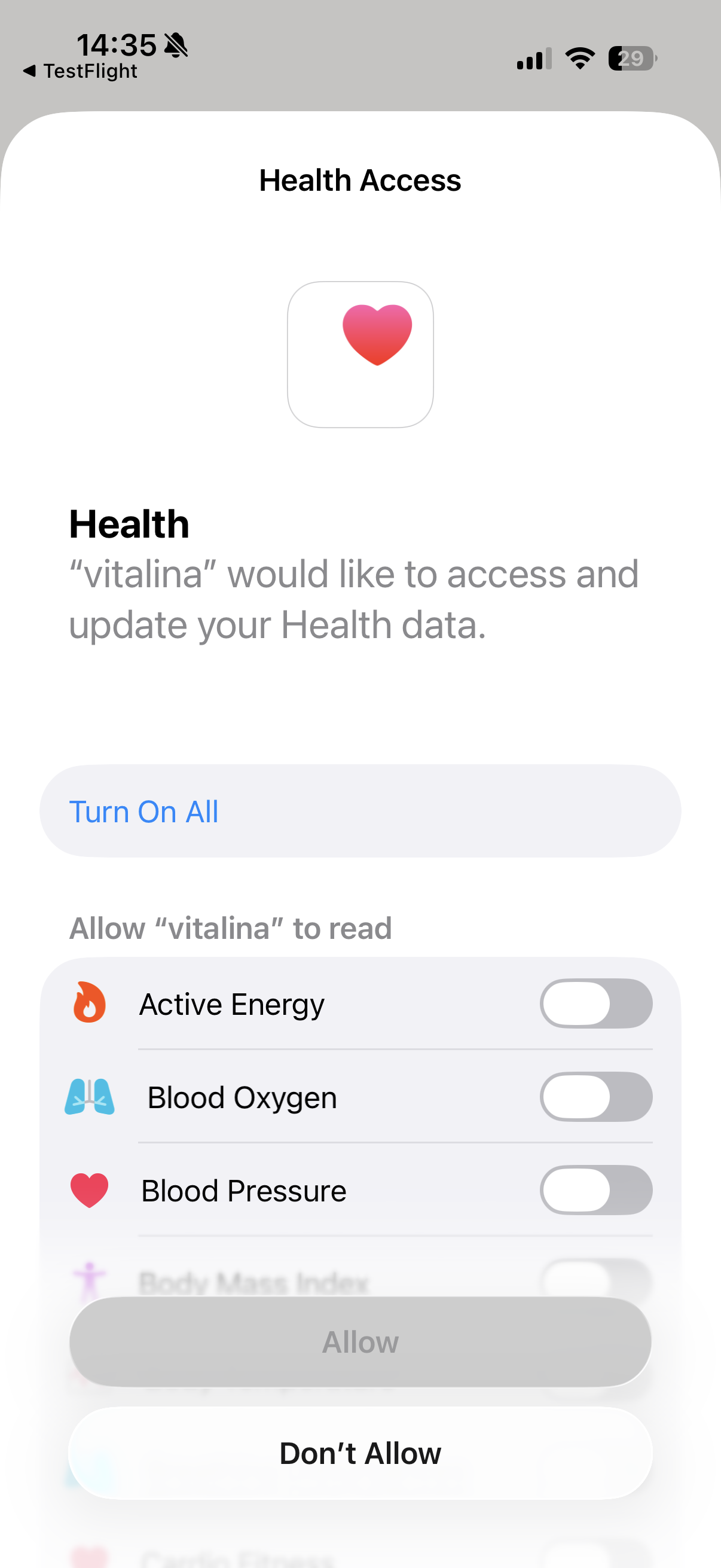
When you first open vitalina, tap Allow Health Access and confirm the permissions. vitalina only requests read access; it cannot modify or delete your health data, and nothing leaves your iPhone.
Step 3: Open the General Symptoms group and pick your symptoms
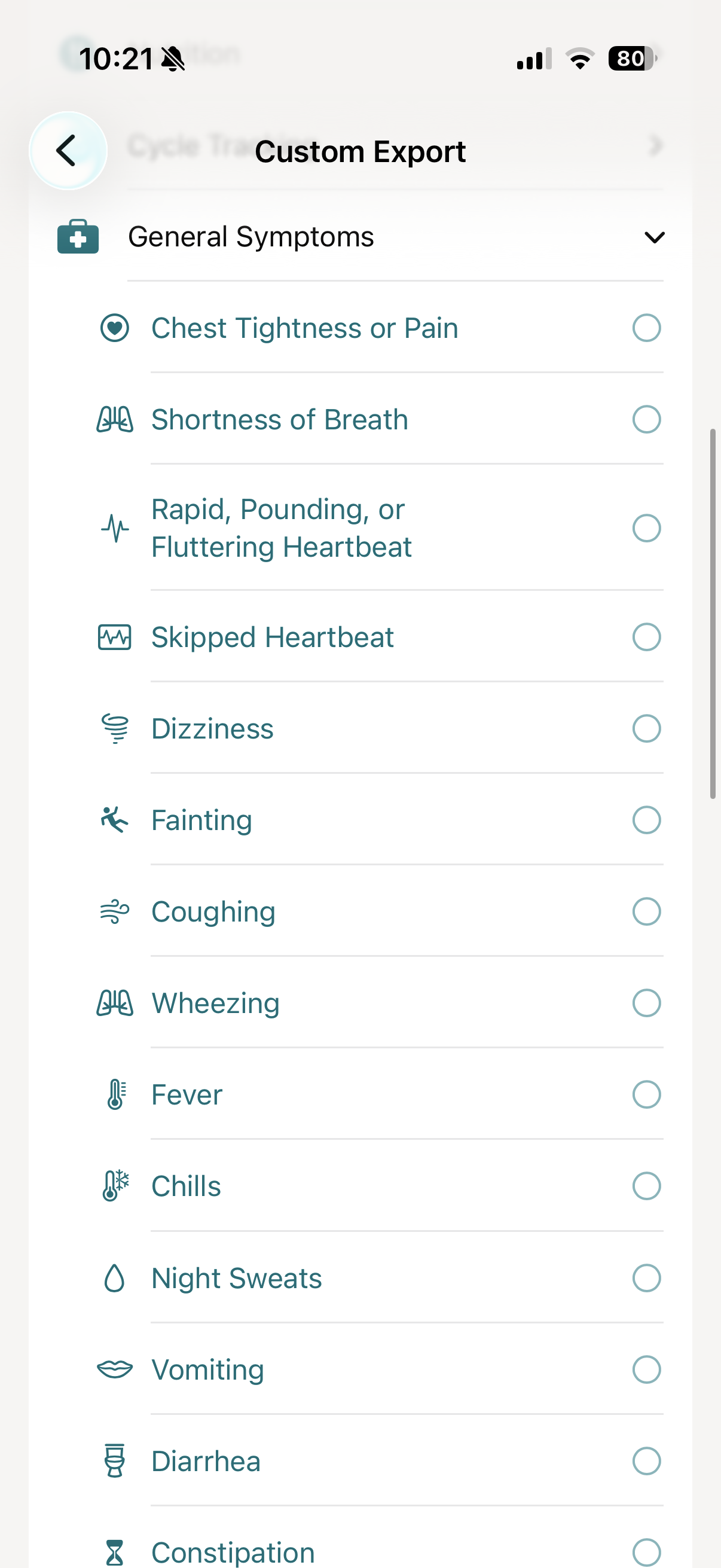
Create a custom export and scroll to the General Symptoms group. Tap each symptom you want to include - or add related vitals such as heart rate or body temperature on the same screen so they appear in the same report.
Step 4: Pick a date range
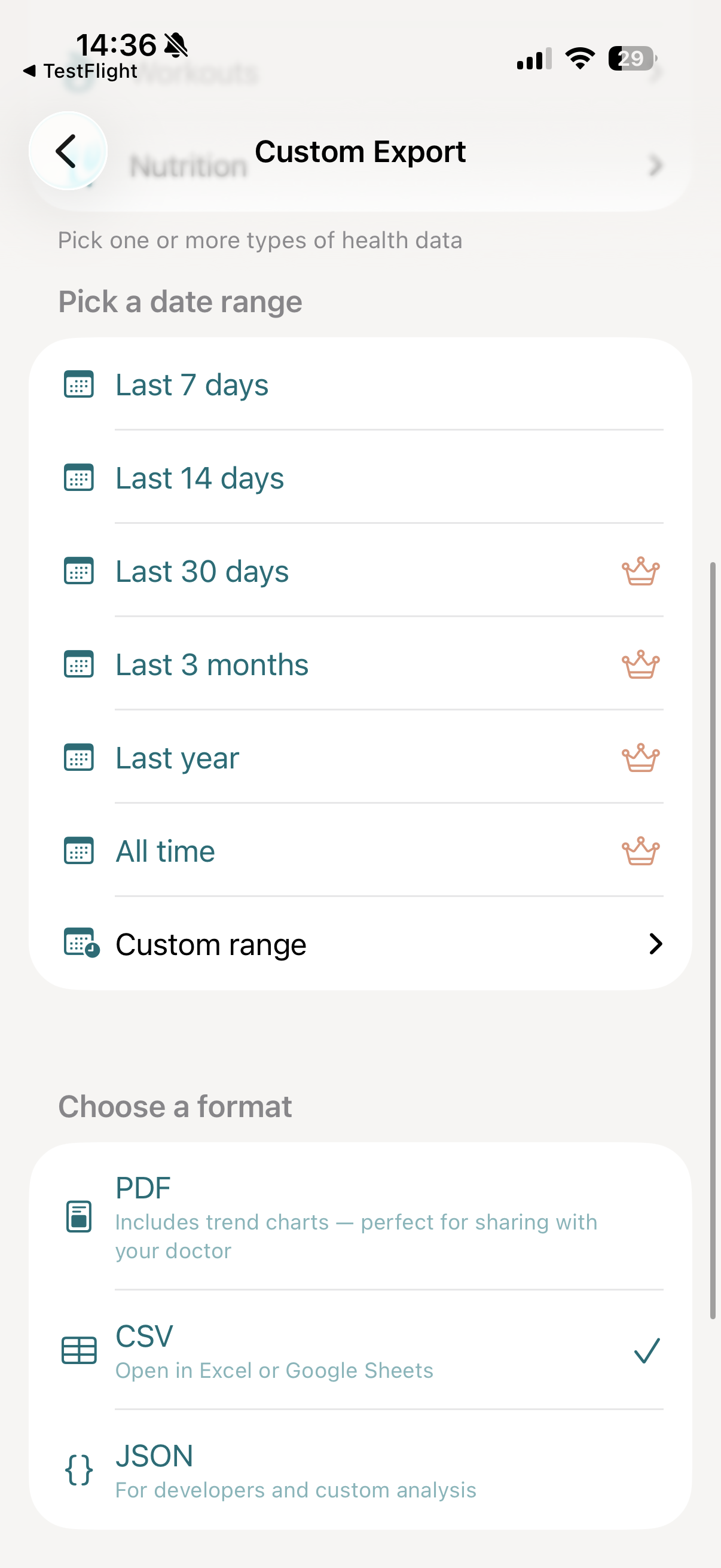
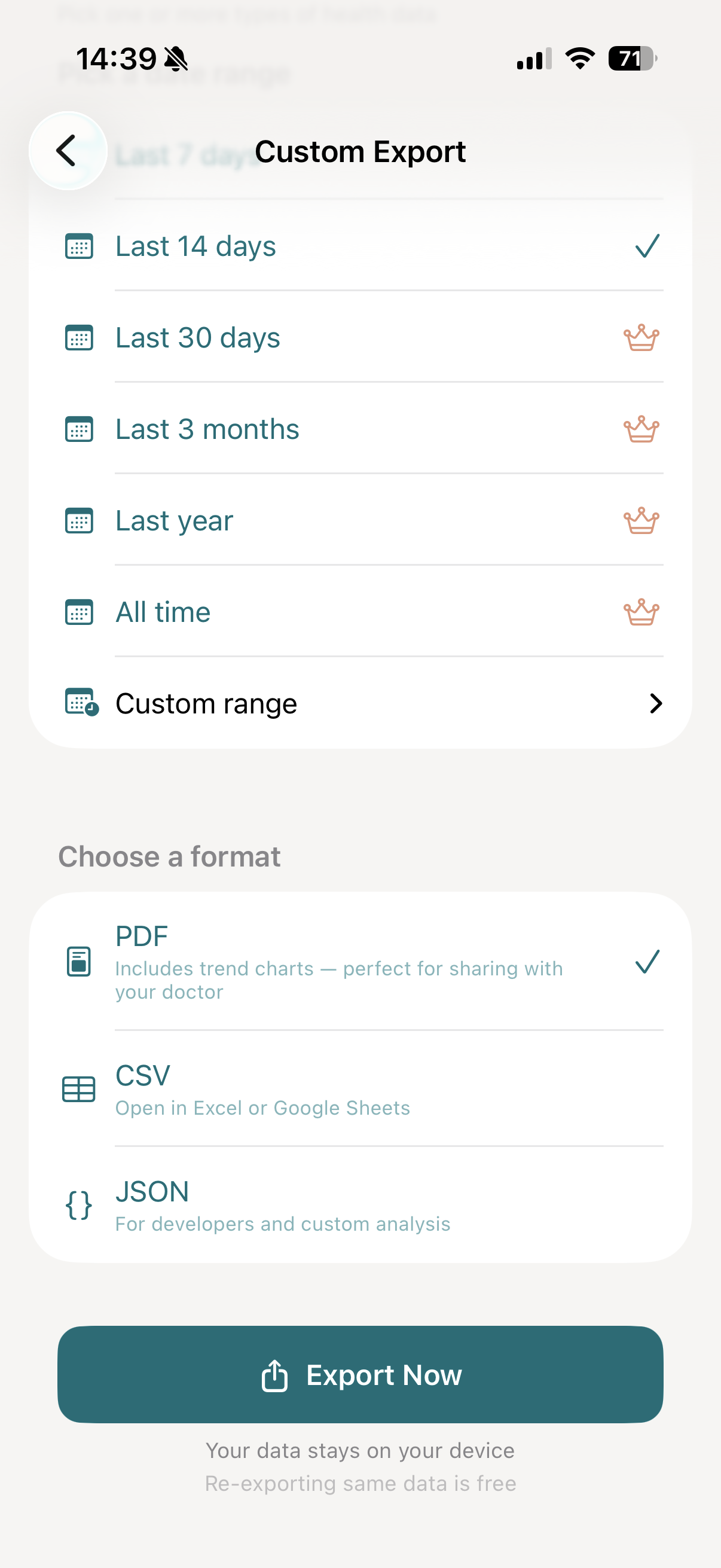
Choose Last 7 days or Last 14 days for free, or upgrade to vitalina Pro for 30 days, 3 months, 1 year, all-time, or a custom range - handy when a doctor wants a symptom diary spanning a whole treatment.
Step 5: Choose your export format
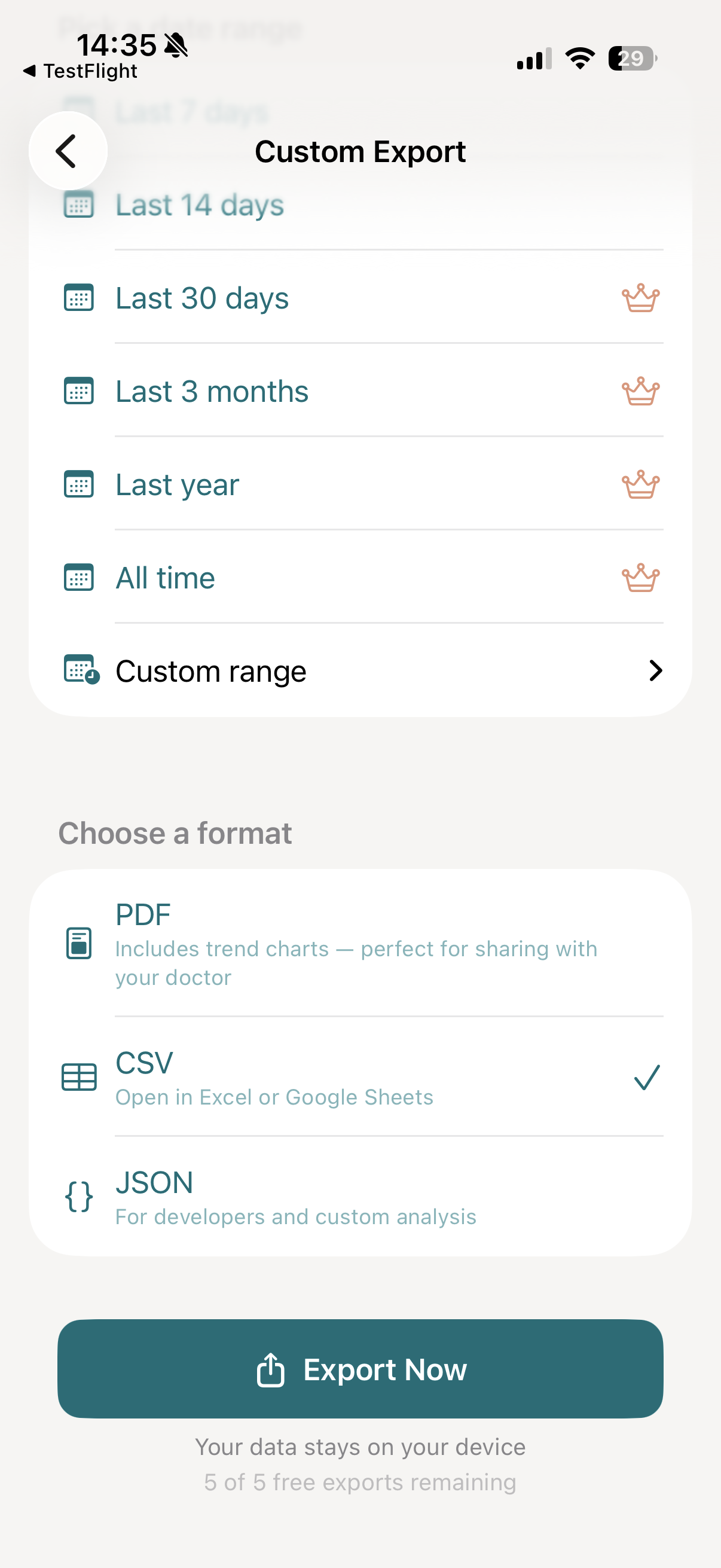
- PDF: a doctor-ready report with a severity chart per symptom and a complete log table.
- CSV: one row per entry with date, symptom, and severity - opens in Excel, Google Sheets, or Numbers.
- JSON: structured records for analysis tooling. See the export format reference for the exact schema.
Step 6: Export and share
Tap Export Now. vitalina reads your logged symptoms and generates the file within seconds - then email it to your care team, AirDrop it, save it to Files, or print a copy for your appointment.

All 25 symptoms you can export
vitalina exports every symptom in Apple Health's General Symptoms set. Most are recorded with a severity; each row below shows what the symptom captures and an example of the value you'd see in your export.
| Symptom | What it captures | Example |
|---|---|---|
| Chest Tightness or Pain | Chest tightness or pain you've logged in Apple Health, with its severity. | Mild |
| Shortness of Breath | Shortness of breath you've logged in Apple Health, with its severity. | Mild |
| Rapid, Pounding, or Fluttering Heartbeat | A rapid, pounding, or fluttering heartbeat you've logged in Apple Health, with its severity. | Mild |
| Skipped Heartbeat | A skipped heartbeat you've logged in Apple Health, with its severity. | Mild |
| Dizziness | Dizziness you've logged in Apple Health, with its severity. | Mild |
| Fainting | Fainting you've logged in Apple Health, with its severity. | Mild |
| Coughing | Coughing you've logged in Apple Health, with its severity. | Mild |
| Wheezing | Wheezing you've logged in Apple Health, with its severity. | Mild |
| Fever | Fever you've logged in Apple Health, with its severity. | Mild |
| Chills | Chills you've logged in Apple Health, with their severity. | Mild |
| Night Sweats | Night sweats you've logged in Apple Health, with their severity. | Mild |
| Vomiting | Vomiting you've logged in Apple Health, with its severity. | Mild |
| Diarrhea | Diarrhea you've logged in Apple Health, with its severity. | Mild |
| Constipation | Constipation you've logged in Apple Health, with its severity. | Mild |
| Heartburn | Heartburn you've logged in Apple Health, with its severity. | Mild |
| Appetite Changes | Appetite changes you've logged in Apple Health, noted as increased, decreased, or no change. | Decreased |
| Dry Skin | Dry skin you've logged in Apple Health, with its severity. | Mild |
| Hair Loss | Hair loss you've logged in Apple Health, with its severity. | Mild |
| Body Ache | A generalized body ache you've logged in Apple Health, with its severity. | Moderate |
| Loss of Smell | Loss of smell you've logged in Apple Health, with its severity. | Mild |
| Loss of Taste | Loss of taste you've logged in Apple Health, with its severity. | Mild |
| Memory Lapse | Memory lapses you've logged in Apple Health, with their severity. | Mild |
| Runny Nose | A runny nose you've logged in Apple Health, with its severity. | Mild |
| Sinus Congestion | Sinus congestion you've logged in Apple Health, with its severity. | Moderate |
| Sore Throat | A sore throat you've logged in Apple Health, with its severity. | Mild |
How symptom severity is exported
Apple Health doesn't just record that a symptom happened - it stores how severe it was. vitalina surfaces that exact value. Most symptoms use a five-level severity scale:
Appetite Changes is the one exception - Apple records it as one of No Change, Decreased, Increased instead of a severity, and vitalina exports it exactly that way.
How much does vitalina cost?
vitalina is free with 5 unique exports and date ranges up to 14 days. vitalina Pro is a one-time purchase (no subscription) that unlocks unlimited exports and extended date ranges up to all time.
Frequently asked questions about exporting Apple Health symptoms
Can you export symptoms from Apple Health?
Yes. Apple Health stores the symptoms you log in its General Symptoms section, but has no built-in export for them. vitalina lets you export all 25 symptom types in your chosen date range as a single PDF, CSV, or JSON file, each with the severity you recorded.
Which symptoms can vitalina export?
All 25 of Apple Health's General Symptom types - from Chest Tightness or Pain and Shortness of Breath through Fever, Chills, and Sore Throat. The full list is in the table above.
Does the export include how severe each symptom was?
Yes. Apple Health records most symptoms as Not Present, Present, Mild, Moderate, or Severe, and vitalina exports that exact value rather than collapsing every entry to a bare occurrence. Appetite Changes is recorded as Decreased, No Change, or Increased.
Is my symptom data safe when I export it?
Yes. Everything is processed locally on your iPhone. Nothing is uploaded to any server, there is no account and no cloud storage, and the file stays on your device until you share it.
What languages does vitalina support?#
vitalina is fully localized in 7 languages - English, German, Spanish, French, Portuguese (Brazil), Japanese, Russian. The app interface and every Apple Health metric name are translated, so your exports come out in your language. This page is in English, but the app follows your device language with no setup required. For example, Fever appears as:
| Language | Fever |
|---|---|
| EnglishEnglish | Fever |
| GermanDeutsch | Fieber |
| SpanishEspañol | Fiebre |
| FrenchFrançais | Fièvre |
| Portuguese (Brazil)Português (Brasil) | Febre |
| Japanese日本語 | 発熱 |
| RussianРусский | Жар |
Keep reading
Other Apple Health export guides
Step-by-step tutorials for every metric vitalina can export.
- Export Blood PressureSystolic and diastolic readings for your cardiologist.
- Export Heart RateResting, active, and HRV for your cardiologist or sports medicine doctor.
- Export Blood GlucoseCGM and fingerstick readings for your endocrinologist.
- Export Sleep DataSleep stages and duration for sleep specialists.
- Export WeightWeight, BMI, and body fat trends for your dietician or GP.
- Export ActivitySteps, distance, and active energy for physical therapy or rehab.
- Export WorkoutsWorkout sessions with duration, calories, and heart rate.
- Export Cycle TrackingPeriod flow, spotting, cramps, and basal body temperature for your OB-GYN.
- Export Calories & NutritionDaily calories, macros, vitamins, and minerals for your dietician or nutritionist.
- Export ECGApple Watch ECG strips with waveform, classification, and average heart rate for your cardiologist.
- Export Mental Health (State of Mind)Apple Health mental health logs with valence, emotion labels, and life-context associations for your therapist or psychiatrist.
- Export MedicationsYour Apple Health medication list and full dose log for your doctor - iOS 26 and later.
- Export Format ReferenceExact CSV columns and JSON schemas, plus a searchable dictionary of every exportable Apple Health metric.
- Export Apps & DevicesRenpho, Omron, Eight Sleep, Stelo, Flo and more - export data from any app that syncs to Apple Health.
- Export ExcelOpen your Apple Health CSV in Excel and build charts or PivotTables - works on Windows, Mac, and iPad.