
How to Export Medications from Apple Health
A step-by-step guide to exporting the medications you track in Apple Health - your standing medication list plus every dose you logged - as a single PDF, CSV, or JSON for your doctor.
Last updated: September 3rd, 2026

By Marina
Co-founder, vitalina
Before you start
Exporting medications needs iOS 26 or later, vitalina 1.15.0 or later, and vitalina Pro. On earlier iOS versions the Medications category does not appear in the app at all - not a vitalina limitation, but Apple's: until iOS 26 there was no way for any app to read medication data.
The Health app has tracked medications since iOS 16: the list of what you take, the schedule you set, and a tap to log each dose. It is one of the most useful things in Apple Health for an actual appointment - and for years it was the one thing you could not get out of it into an app of your choosing.
That changed with iOS 26. This guide shows you how to export your medication list, and the doses you logged in any date range, as one PDF, CSV, or JSON using vitalina, an iPhone app that reads your Apple Health data locally and never uploads it anywhere.
Why medications could not be exported before iOS 26
Medications arrived in the Health app in 2022 as a feature for you, with no developer access whatsoever. No app on the App Store could read your medication list, which is why no health export app supported it - including vitalina.
iOS 26 shipped the HealthKit Medications API and made it readable, on a strictly read-only basis: an app can show you your medications and doses, and can never create, change, or delete one. vitalina 1.15.0 was built on that API.
If you are on an older iPhone, Apple's own workaround still exists: open the Health app, go to Browse > Medications, and choose Export Medications List PDF. It gives you the list, but not your dose log, and it cannot be combined with your other health data in one report.
Step 1: Install or update vitalina
Install vitalina from the App Store or update it to 1.15.0 or later. The app is free to use with no account or sign-up; medications specifically are part of vitalina Pro, a one-time purchase.
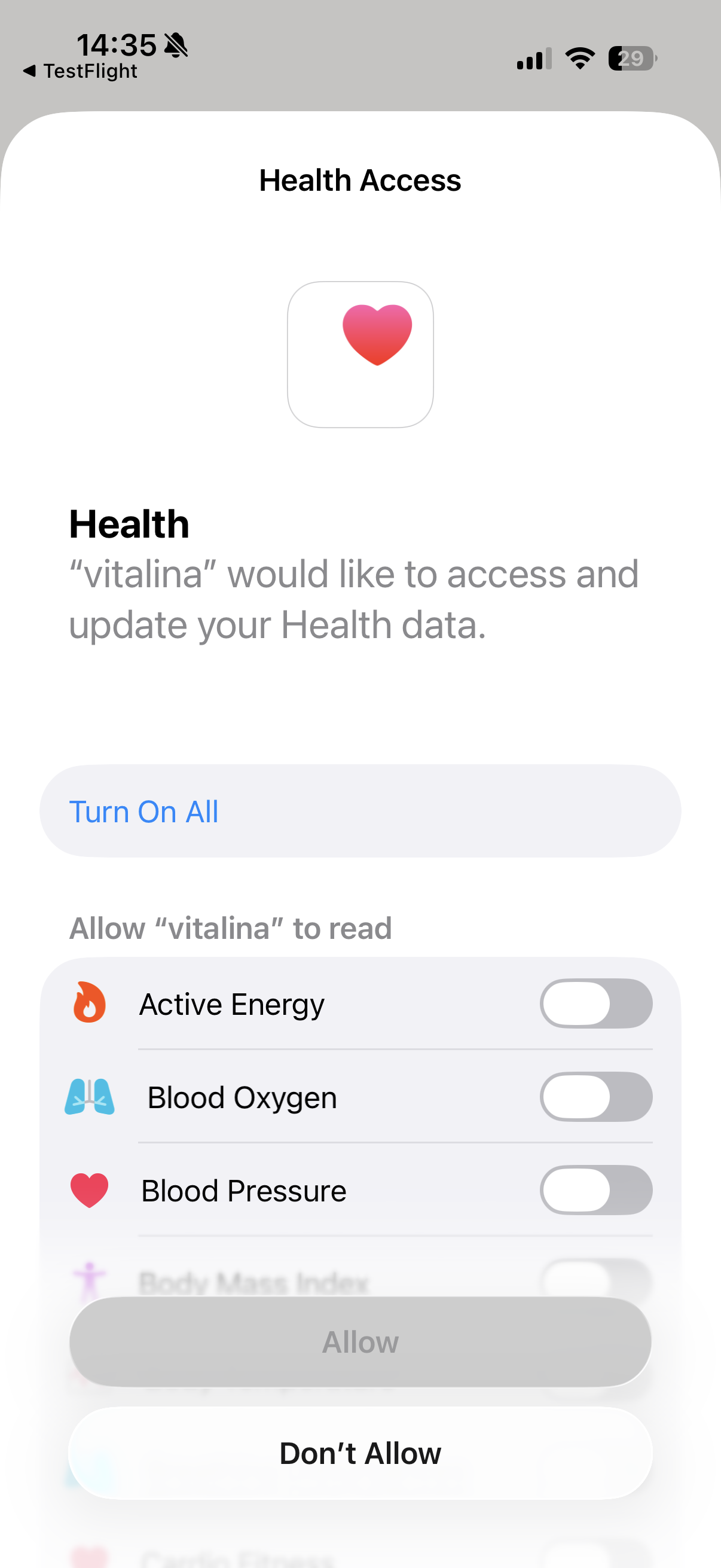
Step 2: Approve the medications you want to share
This step works differently from every other kind of health data. For heart rate or sleep you grant access to a category once. For medications, Apple shows you one switch per medication: you decide individually which ones an app may read, and you can turn any of them off again later in Health > Sharing > Apps.
Sharing only some of your medications is completely normal, not an error. Every medication report vitalina produces states on the page that it reflects only the medications you shared - so a doctor is never misled into reading a partial list as your complete one.
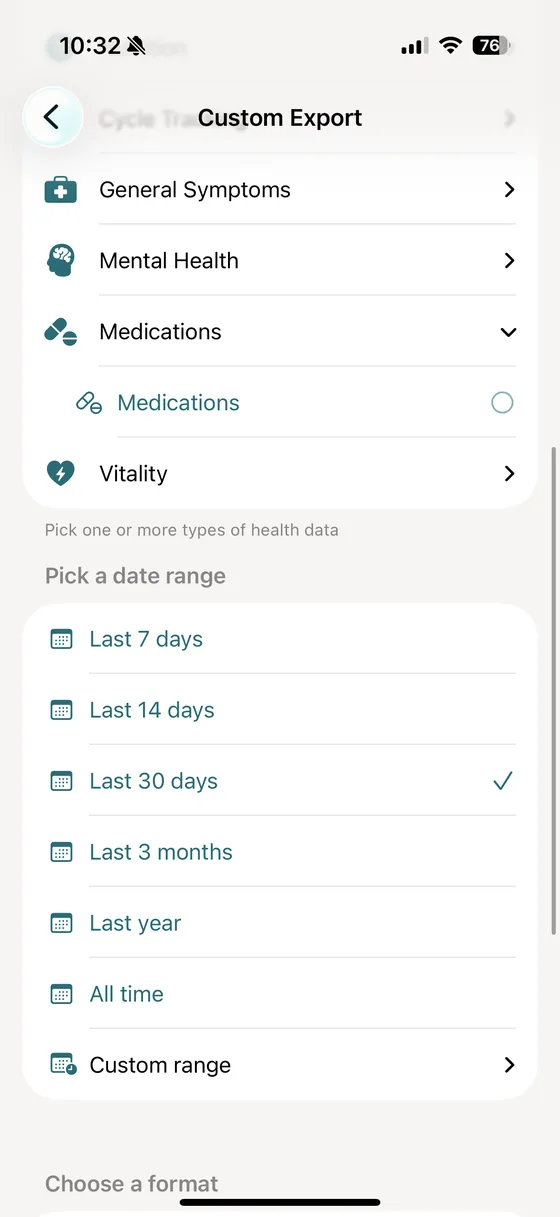
Step 3: Select Medications in a custom export
Create a custom export and scroll to the Medications group, then select the Medications data type inside it. You can add other data to the same export - many people pair medications with blood pressure or symptoms so a single report shows what changed and what was taken.
Step 4: Pick a date range
The date range applies to your dose log. Your medication list itself is a standing roster with no dates, so it is always exported in full - a 7-day export still shows everything you currently take.
Because medications are a Pro feature, every range is available to you: 30 days, 3 months, 1 year, all time, or a custom range. Three months is a good default for a routine review; match the range to the treatment your doctor wants to look at.
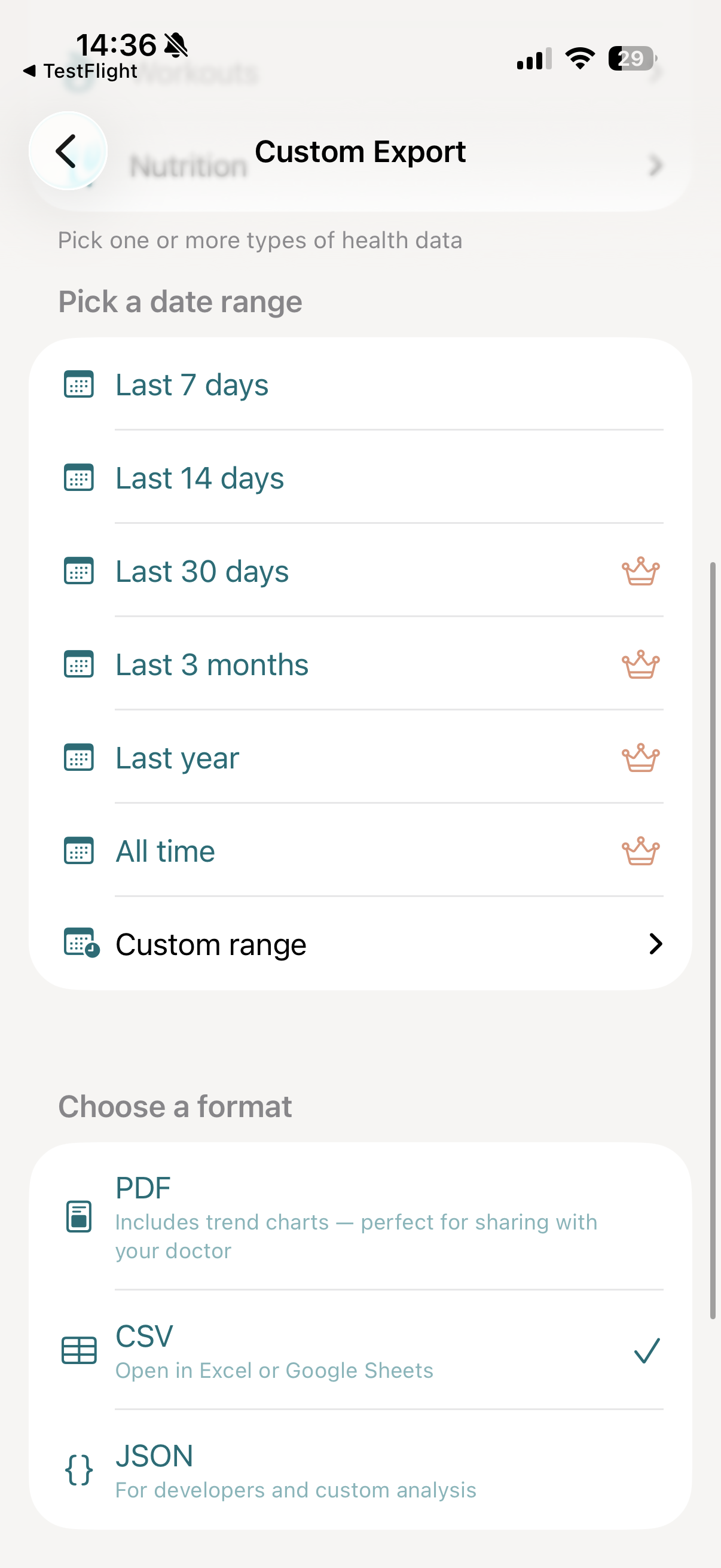
Step 5: Choose your export format
- PDF: a doctor-ready Medication Report with a summary, your medication list, a dose history that shows when a logged dose changed, and the dose log grouped per medication.
- CSV: two tables - the medication list and the dose log - that open in Excel, Google Sheets, or Numbers.
- JSON: one record per medication with its doses nested inside, for analysis tooling. See the export format reference for the wider schema.
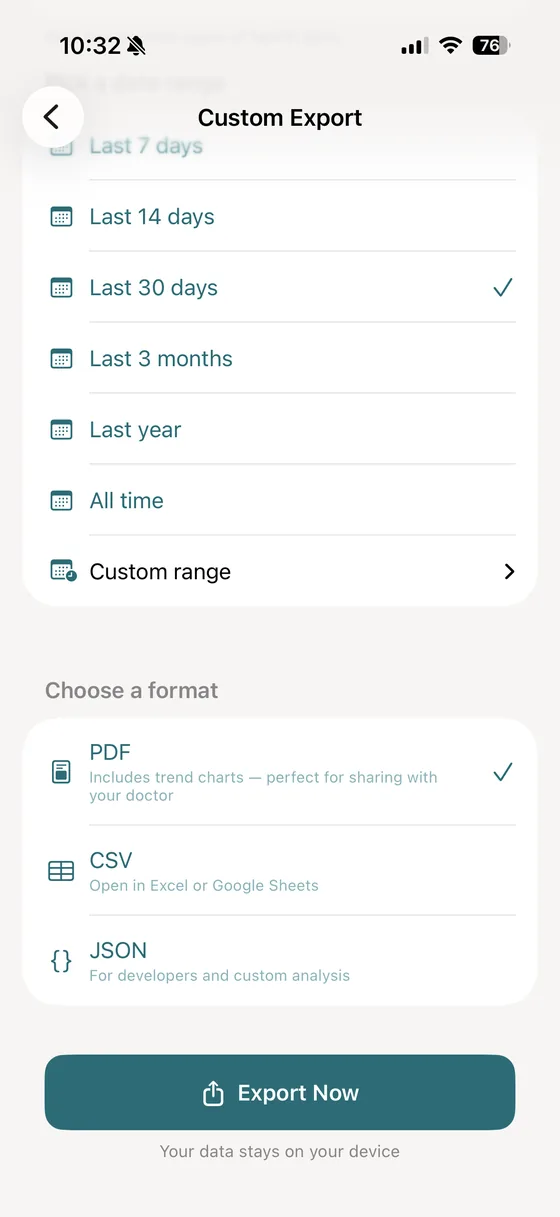
Step 6: Export and share
Tap Export Now. vitalina builds the file on your iPhone within seconds - then email it to your care team, AirDrop it, save it to Files, or print a copy to take with you.
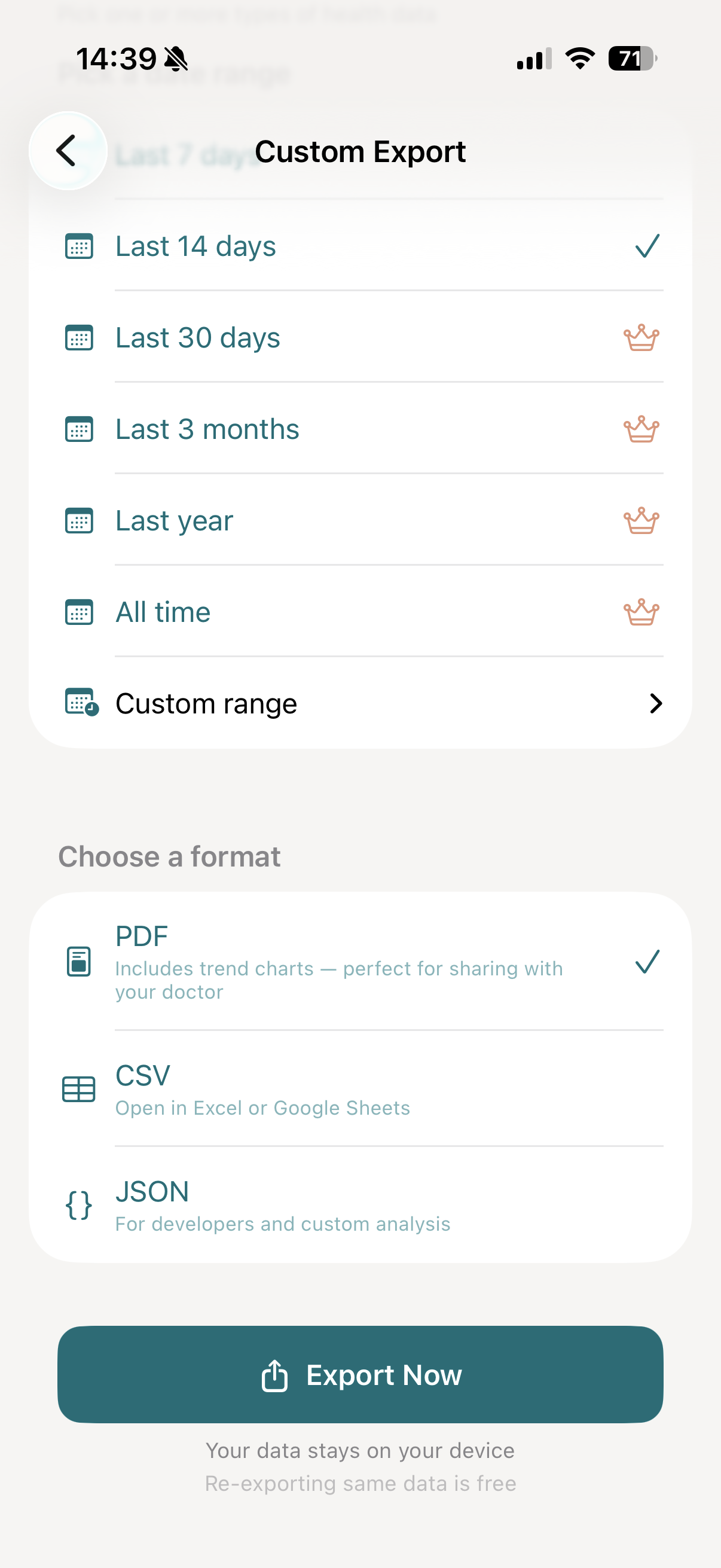
What the medication PDF contains
The PDF is the format built for the appointment itself. A medication report has four parts, in this order:
- Summary - how many active medications, how many archived, and how many doses were logged in the period.
- Medication List - one row per medication with its dosage form, whether it is active or archived, and its dose count.
- Dose History - each medication's taken doses in periods of the same logged dose, with the first and last date of each. Going from one tablet to two starts a new row, so the day a dose changed is easy to find.
- Dose Log - a table per medication showing each dose with the date it was logged, the date it was scheduled, its status, and the amount.
Above all of it sits one line of context: "This report reflects the medications shared with vitalina in Apple Health." It is there for the reader, not for you - a doctor should never assume a shared list is an exhaustive one.
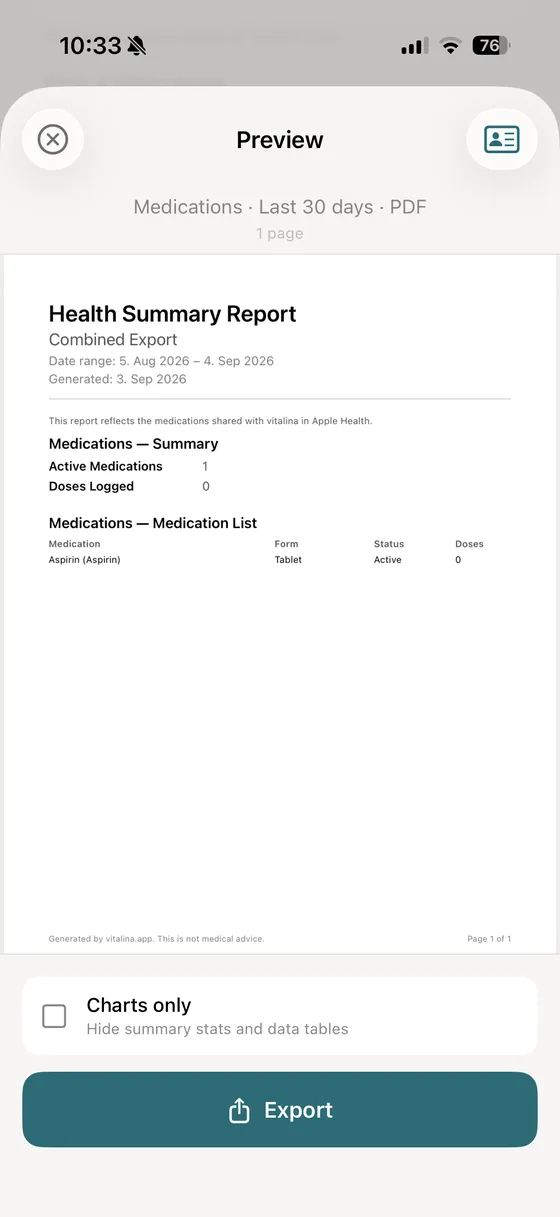
Preview of a medications export. On its own it is titled Medication Report; combined with other data it becomes a section of your Health Summary Report under the same headings. The Dose Log appears once there are doses in the period, and the Dose History once one of them is marked as taken.
What the CSV export contains
Medications are the one export that writes two CSV tables, because the two halves have different shapes: the medication list has no dates, the dose log does. Every row of the dose log names its medication - the name Apple Health stores, your nickname, and the dosage form - so it reads on its own in a spreadsheet. The Medication Ref column (med-1, med-2, …) appears in both tables and links them - handy for a VLOOKUP or a pivot table.
medications.csv
The standing medication list, one row per medication.
medication-doses.csv
The dose log for your date range, one row per logged dose, each naming its medication.
Opening these in a spreadsheet? The Excel guide covers importing without mangled dates.
What the JSON export contains
JSON keeps the relationship intact instead of splitting it: a medications array where each medication carries its own doses array, so no re-joining is needed.
| Field | What it holds |
|---|---|
| canonicalName | The medication name as Apple Health stores it, e.g. "Aspirin". |
| nickname | The name you gave it in the Health app, when you set one. |
| generalForm | The dosage form, e.g. "Tablet". |
| hasSchedule | Whether you set a dosing schedule for it in Apple Health. |
| isArchived | Whether you have archived the medication in Apple Health. |
| doses | The dose events logged inside your date range, nested per medication. |
| doses[].date | When the dose was logged, as an ISO 8601 timestamp. |
| doses[].scheduledDate | When the dose was scheduled, when it belonged to a schedule. |
| doses[].status | The log status, e.g. "taken" or "skipped". |
| doses[].doseQuantity | How much was actually taken. |
| doses[].scheduledDoseQuantity | How much was scheduled, kept separate rather than reconciled. |
| doses[].unit | The unit the quantity is counted in, e.g. "count" for tablets. |
| doses[].sourceName | Which app or device recorded the dose event. |
Every dose status vitalina exports
Apple Health does not only record that a dose happened - it records what happened to it. vitalina prints all 7 statuses exactly as recorded. Nothing is filtered out to make a log look tidier, because "Skipped" and "No Response" are precisely what a doctor is looking for.
| Status | What it means |
|---|---|
| Taken | You confirmed the dose was taken. |
| Skipped | You explicitly marked the dose as skipped. |
| Snoozed | You postponed the reminder for this dose. |
| Not Logged | The dose was scheduled but never logged either way. |
| No Response | A reminder was shown and you did not interact with it. |
| Reminder Not Sent | The scheduled reminder was never delivered by iOS. |
| Unknown | A status Apple added after this version of vitalina shipped. |
Doses can be logged days after the fact, so the log is ordered by the scheduled time where there is one, and by the logged time otherwise. A dose entered late lands where it belongs in the report rather than at the end.
Dosage forms in the export
Each medication carries the dosage form Apple Health has for it, printed in your language:
What is not in the export
Worth knowing before you promise your doctor a full medication history. Some of this Apple does not expose; some of it we deliberately do not do.
- No prescriber or pharmacy, no start and end dates, no refill counts, and no instruction text - Apple's API simply does not include them.
- No separate strength field. When you pick a medication from Apple's drug list, available in the US, its name usually includes the strength, so "Atorvastatin 20 mg" exports with that text intact. Where you type the name yourself and enter the strength in a separate step, as everywhere outside the US, Apple Health does not share that strength with apps. Add it to the medication's Display Name in the Health app (for example "Bisoprolol 2.5 mg") and every export shows it. vitalina never tries to parse a number out of a drug name.
- No adherence score. vitalina reports what was logged and counts it; it does not calculate a percentage, grade your week, or tell you that you missed three doses. Interpretation belongs to you and your doctor.
- No interaction or side-effect warnings. vitalina is an export tool, not a medical one.
- No doctor-issued prescriptions. Those live in Apple's Health Records, a separate feature that connects to your clinic. vitalina does not read it.
How much does vitalina cost?
vitalina is free with 5 unique exports and date ranges up to 14 days. Medications are part of vitalina Pro, a one-time purchase from €3.99 - no subscription - which also unlocks unlimited exports and date ranges up to all time.
Frequently asked questions about exporting Apple Health medications
Can you export your medication list from Apple Health?
Yes, on iOS 26 or later. Apple added Medications to the Health app in iOS 16 but gave apps no way to read it until the HealthKit Medications API shipped in iOS 26. vitalina 1.15.0 and later uses that API to export the medications you track, with their dosage form and schedule, plus every dose you logged in your date range, as a PDF, CSV, or JSON file. On older iOS versions no app can read medication data at all; there, use Apple's own Health app > Medications > Export Medications List PDF.
What do I need to export medications with vitalina?
Three things: an iPhone running iOS 26 or later, vitalina 1.15.0 or later, and vitalina Pro. On iOS 25 and earlier the Medications category does not appear in the export catalog at all, because the API that reads it does not exist there.
Why does vitalina ask about medications one at a time?
Because Apple designed medication access that way. Every other health category is a single on/off permission, but medications are approved individually, so you can share your blood pressure tablet and withhold something you would rather keep private. Sharing only some of them is completely normal, and every medication PDF says so on the page, so a doctor never reads a partial list as a complete one.
Does the export show whether I actually took each dose?
It shows exactly what Apple Health recorded: every logged dose with its status - Taken, Skipped, Snoozed, Not Logged, No Response, or Reminder Not Sent - alongside the scheduled time and the amount. vitalina never calculates an adherence score or a "doses missed" percentage. That is a judgement for you and your doctor, not for an export tool.
Can the export show when my medication dose changed?
Yes, as far as Apple Health records it. The PDF's Dose History lists each medication's taken doses in periods of the same logged dose, with the first and last date of each, so going from one tablet to two shows up as a new row. A new strength is a new medication in the Health app - the strength of a saved medication can't be edited - so it gets its own rows in the medication list and the Dose History; outside the US, add the strength to its Display Name so the two can be told apart. vitalina shows the dates and doses exactly as logged and never judges a change, and the CSV and JSON carry every single dose.
Does the export include the prescribing doctor or the strength?
Not the prescribing doctor, and the strength only where Apple Health shares it. Apple's Medications API gives apps a display name, a dosage form, whether a schedule exists, and the dose log - nothing else: no prescriber, pharmacy, refill count, or separate strength field. When you pick a medication from Apple's drug list, available in the US, its name usually includes the strength, so "Atorvastatin 20 mg" exports with that text intact. Outside the US, where you type the name and enter the strength in a separate step, Apple Health does not share that strength with apps; add it to the medication's Display Name in the Health app (for example "Bisoprolol 2.5 mg") and every export shows it. Doctor-issued prescriptions live in Health Records, a separate Apple feature vitalina does not read.
Is my medication data safe when I export it?
Yes. Everything is processed on your iPhone. Nothing is uploaded to any server, there is no account and no cloud storage, and the exported file stays on your device until you choose to share it. Medications are the most sensitive data vitalina touches, and the rule is the same as for everything else: your data never leaves your device.
What languages does vitalina support?#
vitalina is fully localized in 7 languages - English, German, Spanish, French, Portuguese (Brazil), Japanese, Russian. The app interface and every Apple Health metric name are translated, so your exports come out in your language. This page is in English, but the app follows your device language with no setup required. For example, Medications appears as:
| Language | Medications |
|---|---|
| EnglishEnglish | Medications |
| GermanDeutsch | Medikamente |
| SpanishEspañol | Medicamentos |
| FrenchFrançais | Médicaments |
| Portuguese (Brazil)Português (Brasil) | Medicamentos |
| Japanese日本語 | 服薬 |
| RussianРусский | Лекарства |
Keep reading
Other Apple Health export guides
Step-by-step tutorials for every metric vitalina can export.
- Export Blood PressureSystolic and diastolic readings for your cardiologist.
- Export Heart RateResting, active, and HRV for your cardiologist or sports medicine doctor.
- Export Blood GlucoseCGM and fingerstick readings for your endocrinologist.
- Export Sleep DataSleep stages and duration for sleep specialists.
- Export WeightWeight, BMI, and body fat trends for your dietician or GP.
- Export ActivitySteps, distance, and active energy for physical therapy or rehab.
- Export WorkoutsWorkout sessions with duration, calories, and heart rate.
- Export Cycle TrackingPeriod flow, spotting, cramps, and basal body temperature for your OB-GYN.
- Export Calories & NutritionDaily calories, macros, vitamins, and minerals for your dietician or nutritionist.
- Export ECGApple Watch ECG strips with waveform, classification, and average heart rate for your cardiologist.
- Export Mental Health (State of Mind)Apple Health mental health logs with valence, emotion labels, and life-context associations for your therapist or psychiatrist.
- Export SymptomsGeneral Symptoms like fever, cough, and dizziness with their severity for your doctor.
- Export Format ReferenceExact CSV columns and JSON schemas, plus a searchable dictionary of every exportable Apple Health metric.
- Export Apps & DevicesRenpho, Omron, Eight Sleep, Stelo, Flo and more - export data from any app that syncs to Apple Health.
- Export ExcelOpen your Apple Health CSV in Excel and build charts or PivotTables - works on Windows, Mac, and iPad.